Overview
On HWS you can put a price on another player’s head: a bounty that someone else collects by killing them in PvP. Everyone with a bounty is Wanted and gets a Wanted poster on the Hunter Board. This guide explains the Wanted system: placing a bounty, who can collect it, when the board shows where a target is, and the HWS bounty of dangerous areas.
 HWS Connect → HWS Community → Hunter Board (NA players:
/rn/hunter-board)
New Wanted system (October 2026): bounties are no longer refunded to the side that paid, placing one costs a 20 % HWS fee, the board shows locations only for PvP hunts, and the old Guilty status and
egs:noguiltyare gone.
 The Hunter Board
 shows every Wanted player on both servers of the pair (HWS+ RE EU and HWS+ RE NA) as a Wanted poster. Tabs under Recently collected switch between HWS+ RE EU, HWS+ RE NA and Combined. The board opens on Combined: both servers’ bounties in one list, highest first, each poster (and a Server column in the table) marked with the server the bounty counts on. One name wanted on both servers shows up as two separate bounties.
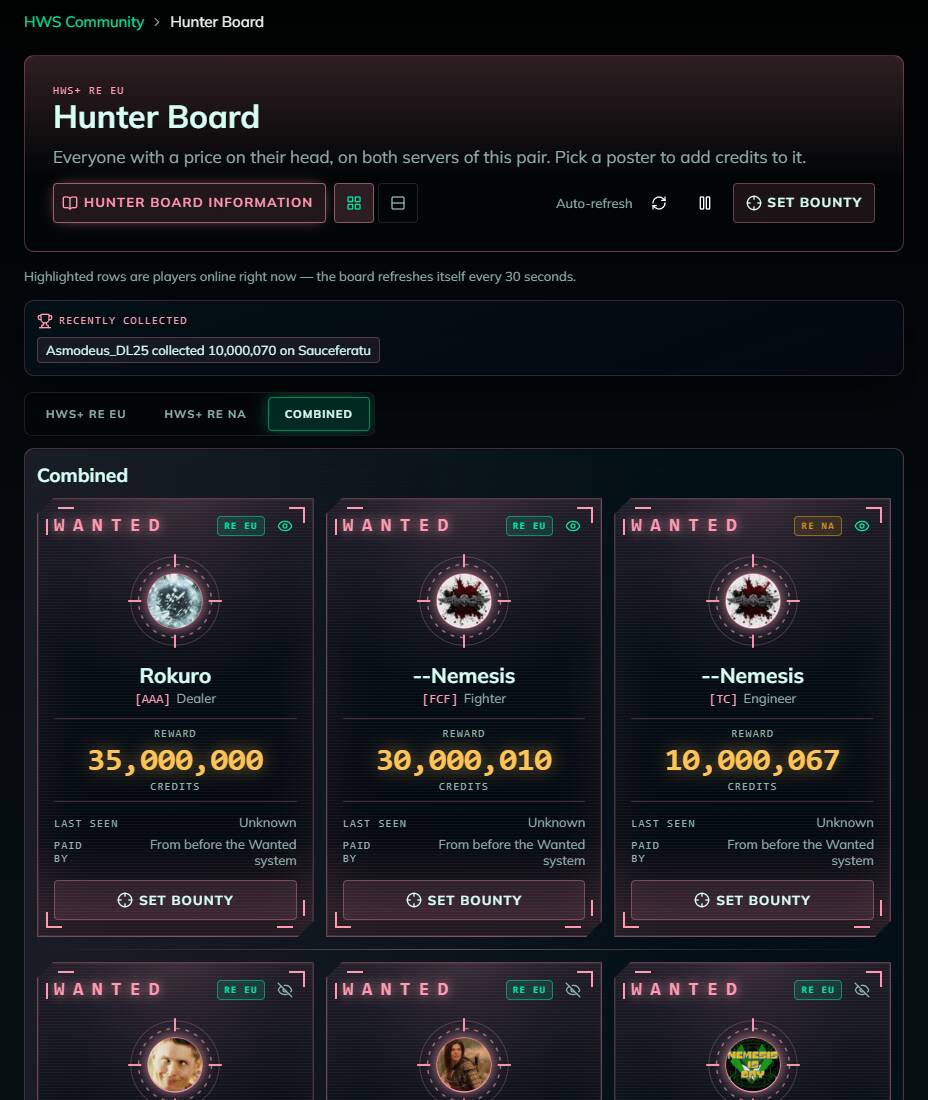
- Reward: the total bounty, made of the player bounty (paid by players) and the HWS bounty (paid by HWS)
- A red WANTED BY HWS stamp: HWS put a price on this head (a Set Wanted area or a staff punishment, see below)
- Last seen: the playfield where the target is, or Unknown (see When the board shows a location)
- Paid by: who paid into the player bounty. “From before the Wanted system” marks an older bounty
- The crosshair shows the player’s Steam profile picture (or the first letter of their name when the site can’t find one)
- A pulsing dot means the player is online now
- After a bounty was collected, the poster says when new bounties open again
- Recently collected above the posters lists the bounties collected in the last days: who collected how much on whom
Prefer a list? Switch to the Table view; the board remembers your choice. The board refreshes itself every 30 seconds, and you must be signed in to see it.
On Online Players, a gold crosshair marks Wanted players. Click it to jump to their poster. Turn on Bounty alerts there to be notified when a Wanted player logs in.
 Watch players (HWS Survivor+)
Click the eye on a poster to get a browser notification when that player logs in. Watched players stay at the top of the board on every tab, in both the poster and the table view, whatever the table is sorted by; a faint line separates them from everyone else. The watch list is shared with Online Players and Settings.
 Placing a Bounty
Method 1: Via HWS Connect
- Click a poster (name and server are filled in), or click Set Bounty at the top
- Choose the Target server (this server or its pair)
- Enter the in-game name of the victim, exactly as written (case sensitive!). If the player already has a bounty, the dialog shows how much
- Enter the bounty credit amount. The dialog shows the HWS fee and the total you pay
- Click RUN!
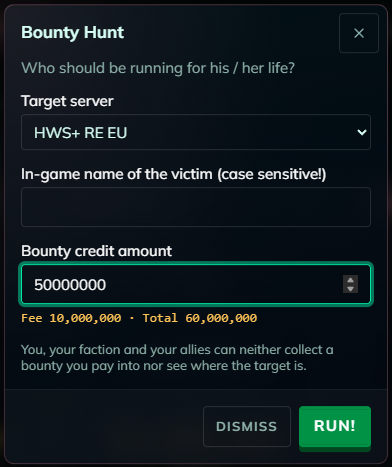
You must be online in game on the target server. You can also use Set Bounty in a player’s ⋯ menu on the Online Players page.
Method 2: In game
egs:bounty:playername:creditAmount
Example: egs:bounty:RexXxuS:100000000 puts 100M on RexXxuS. The game asks Yes/No first and shows the amount, the fee and the total.
The rules
- 20 % HWS fee on top. The amount you enter goes into the bounty; the fee is removed from the economy. A 50M bounty costs you 60M, taken from your Elemental Bank
- Minimum 1M credits per bounty. A player can carry at most 2,147,483,647 credits of player bounty
- Bounties stack: several players can pay into the same bounty
- Once per faction per day: you and your faction can pay into the bounty on the same player once every 24 hours
- Pause after a collect: when a bounty was collected, no new bounty can be placed on that player for 6 hours
- No bounty on yourself, and none while you take part in a player event
- No refunds. Once paid, the credits stay on the target’s head until someone collects them. If you collect it yourself, you get your own credits back but not the fee
If something doesn’t fit (too little, too much, already paid today, just collected), the dialog tells you before anything is sent and nothing is charged. In game, a refusal also charges nothing and the chat says why.
 Collecting a Bounty
Kill the Wanted player in PvP with manual weapons (turret kills don’t count). The bounty goes into your Elemental Bank automatically. You must be online and have an Origin; kills of your own faction members or allies don’t count, and neither do kills on playfields where faction and alliance kills are disabled.
The side that paid can collect too. The kill pays out the whole bounty as usual, so for credits you paid yourself you only get those back and the 20 % fee is lost. Either way the bounty is gone after the kill and the 6-hour pause starts, so the target gets a breather.
The player bounty and the HWS bounty are checked separately: one kill can collect both, one of them, or neither.
 Bounty hunter bonus
Collect a bounty of 10M or more as an Explorer, Fighter or Engineer and you also get 10 HWS DNA, up to 10 times per day, as long as your Origin’s weapon is in your inventory. Fighters additionally get credits that grow with every bounty kill (25,000 × your bounty kills). Dealers don’t get this bonus. See your Origin.
 When the Board Shows a Location
A Wanted poster shows where the target is only when:
- the target has an HWS bounty (on any playfield: HWS broadcasts it), or
- the target is on a PvP playfield and the player bounty is at least 50M
and you are not on the side that paid into the bounty. Otherwise you see Unknown.
You are on the side that paid if:
- you paid into it, or
- your faction paid into it (the faction at the time of payment), or
- you left that faction less than 7 days ago, or
- your faction is allied with a faction that paid into it
Coordinates are never shown, and Online Players never shows where anyone is.
 The HWS Bounty: Set Wanted & Clear Wanted Zones
Some dangerous areas are Set Wanted zones. Enter one and HWS puts a bounty on your head (usually 50M, set per zone). The chat tells you: “You are WANTED … Your position is broadcast on the Hunter Board.” Staff can also set an HWS bounty as a punishment.
While you carry an HWS bounty:
- your poster gets the WANTED BY HWS stamp and shows your location to everyone, also in PvE
- you can’t use EGS Stealth
The HWS bounty ends when:
- someone collects it: HWS pays it to the killer (each killer at most once per target per 24 hours). For 6 hours afterwards a Set Wanted zone doesn’t set it again
- you visit a Clear Wanted zone (it only removes the HWS bounty, never the player bounty)
- the season resets
Walking in and out of a Set Wanted zone doesn’t stack the HWS bounty; it is never raised above the zone’s amount.

egs:noguiltyno longer exists. There is no way to buy off a bounty.
 Season Reset
At a season reset, all open bounties are closed without refund, and HWS bounties and pauses are cleared.
 Common Messages
- “The minimum bounty is 1,000,000 credits.”: raise your amount.
- “You or your faction already paid into the bounty on in the last 24 hours.”: try again tomorrow.
- “The bounty on was just collected. New bounties open at .”: wait until then.
- “ already carries credits, so at most more fit under the 2,147,483,647 credit cap.”: lower your amount.
- “You need credits in the bank: for the bounty and a credit HWS fee.”: deposit more credits in your Elemental Bank.
- The “currently carries” hint doesn’t appear: the name doesn’t exactly match anyone with a bounty on that server. Names are case sensitive.
- “You must be online on this server to do that.”: join the target server in game.
- “The game service did not confirm the command. Check in game before sending it again.”: the bounty may have gone through. Check the board first.