What happened?
=> i cleared my cache on the hws.connect website and from my game threw steam. on the website OCD it show my quant CPUs CV, but in game OCD it shows them as long ranged arrays
Player(s) with issue? (steam name)
=> Skull King92
Server? (+ EU or + NA or RE EU or RE NA)
=> RE NA
When did it happen? (Use server time: type ingame cb:time)
=>
I really made sure that I did the conversion before the public start this time.
Maybe you missed the Discord announcement, so here for you again:
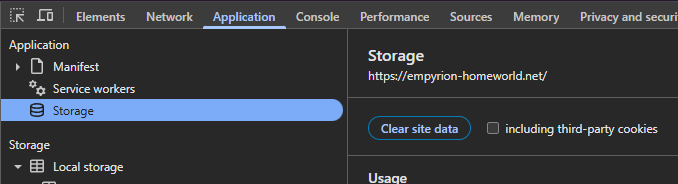
It is super important to that you clear your HWS Connect website data to get the new item icons for OCD due the conversion of 812 items. I’ll program for the new season a big fat button that does it for you but for now, while you are on the HWS Connect page, press F12 and then go to the tab at the top and search for Application. There under Storage click Clear Data.
I saw you wrote that but you did not say how. There are many ways to do it.
I showed you the best way.
And with that way it seems to work for everyone - otherwise I would have seen 20+ tickets already.
Please try again, nuke the website data aggressively. Logout. Relog. Try Private Mode. Other browsers.
Basically there is nothing else I can do anymore to fix it from my side.
@SkullKing92, you can try to open HWS Connect in an incognito/private window. If that works, then it’s definitely just because your cache didn’t clear correctly in your normal browser.
 It is super important to that you clear your HWS Connect website data to get the new item icons for OCD due the conversion of 812 items. I’ll program for the new season a big fat button that does it for you but for now, while you are on the HWS Connect page, press F12 and then go to the tab at the top and search for Application. There under Storage click Clear Data.