LCD Studio lets you design what an in-game LCD or LCD Projector shows, visually in your browser: text, live values (shield, fuel, oxygen …), item counts, symbols, frames, icons, pixel art and even pictures. Then copy the result into your LCD in game.
 HWS Connect → Tools → LCD Studio (NA players:
/rn/tools/lcd)
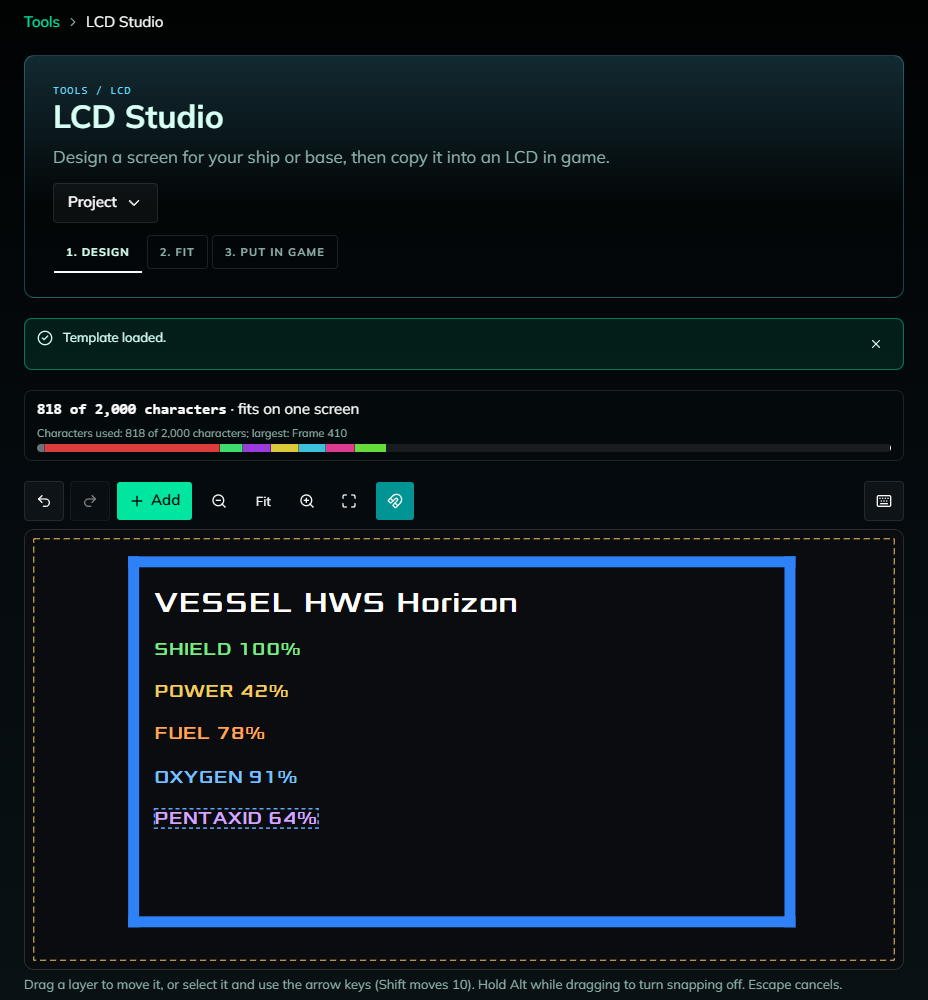
 1. Design
- Start from a template (Ship status, Cargo counts, Hangar, Door sign, Warning sign, Faction nameplate, Picture from an image) or a blank screen
- Pick the Screen type that matches your LCD block in game, the font size and colours
- Add layers: Text, Live value (e.g. “Fuel: %s units”), Item count (count an item on the whole structure or in one container), Symbol, Line, Frame, Icon, Pixel art, Picture from an image
- The bar at the top shows how many of the 2,000 characters of one LCD your design uses
 2. Fit
Too long for one screen? One-click fixes like Use compact code, Use short colours or Use fewer colours, or spread the design over several screens: Side by side, Stacked projectors or Colour layers.
 3. Put in Game
You get a shopping list of the LCD blocks you need and, per screen, its name, settings and a Copy LCD text button:
- Place the LCD (or projector) and give it the shown name
- Look at it, press F, click the text box, press Ctrl+A, then Ctrl+V
- Set the font size and colours shown on the card
Screens with live values or item counts need an extra hidden LCD named
Output:<screen name>that gets the text. In survival, open Eden Science and start the LCD Updater after each login.
 Saving and Sharing
Your work is saved automatically in your browser (not your account). Use Project → Export project for a file, or Share link to send a design to friends. The HWS Assistant on the website can also draft a sign for you (“make an LCD that says Welcome to my base”).
 Free vs. Patreon
Everything is free with one layer. Designs with more than one layer (adding, duplicating or pasting a second layer) are an HWS Elite+ feature. Opening a multi-layer template or a shared link stays free.