HWS Connect | Changelog

HWS Connect 5.85.0

I should stop at some point :see_no_evil: But let’s keep it rollin, since your feedback kept rollin!

  • Added Item info when the OCD Item Sale History popup got opened (as Patreon you can sell items straight out of your OCD)
  • Added Base, CV, SV, GV indicator from the game into HWS Connect! I had to extend the ECF parser for EAH and it is now exporting it to our API (AllowPlacingAt":"Base,MS,SS,GV"). HWS Connect then process this API json and adds it to all items on relevant places (Player Info, OCD, HWS Marketplace page, HWS Trader).
    It was kinda requested for a long time, since the namings in Reforged Eden are often idiotic (CV and BA turrets share the same name, so players sometimes bought the wrong item type). But since I was in the flow and AI is carrying me, I thank for the suggestion here: Discord
  • Fixed a Marketplace unit price change bug

HWS Connect 5.86.0

  • Restyled the header server region select dropdown.
  • Added thousand separator for the Item Sale History flyover tooltips
  • Fixed that the OCD page had the Min Max values shown based on active listings. Therefore Alien Cores showed Min / Max = 0. Now the values are properly fetched from the Market History database table
  • Fixed the new colored type indicators were not working for the dynamic block IDs. All items should show the Base (red) /CV (yellow) /SV (green) /GV (blue) colored square indicator now
  • Fixed that type indicators were not working for child blocks. Now the Referenced parent block is considered (in terms of `AllowPlacingAt: “Base”, “MS”, “SS”, “GV”
  • Fixed that changing just the Max Buyer Playtime of a Marketplace Offer, could trigger the history timer. Now it really triggers only when the credit unit price is changed
  • Fixed that 0 could be set as Max Buyer Playtime. Min. of 10 is the lowest now.
  • Fixed empty blocks/slots got the red and yellow type indicator set

HWS Connect 5.87.1

  • Added new “Daily Trading Volume” for items for Patron Elite and up. It is above the Item Sale History chart (see screenshot). (very old request from a Community member)
  • Implemented Feedback: Discord
  • Added more detailed info for fees when selling items
  • Prepared changes for the next season - feel free to discuss it in the #:ballot_box_with_ballot:hws-re-feedback-and-suggestions channel:
    • Selling items, as in any other game and real life, cost credits and HWS DNA even when inside a zone BUT
    • For the Dealer Origin with EB Level 10 it is still free (for Bank level 9, it is 2% credits only fee, level 8 3% and so on)
    • For any other Origin it is 10% credits fee and 1 HWS DNA
    • Outside the zone it is 20% and 2 HWS DNA now
    • This is also a request from a community member long time ago and comes up overall frequently when it is about selling trash items in high quantity. And to boost the Dealer Origin properly more. Feel free to discuss the change. It is not active yet.
  • Fixed the Bar chart had not tooltip highlight when hovering over it
  • Fixed that the Sell Item(s) button was inactive after a successful trade (you had to refresh the whole page to sell again)

HWS Connect 5.88.11

  • Added a new dedicated, long deserved page for our HWS Patrons in HWS Connect.
    I made it conditional, depending if you are a Patron or not, you see different text/sections (see Screenshot).
    For non Patrons it is hopefully clear enough what the steps are to become a Patron and link the Patron account. Also what benefits you will get / have.
    The Thank You section was moved from the Support Us page to this new page instead, at the bottom where you get also more deserved room, not hidden behind a dropdown mechanic.

  • Fixed missing Block color indicator sometimes
  • Fixed too many request because of the Item History in the OCD page per item got triggered
  • Fixed changing Servers not working smoothly

HWS Connect 5.89.00 - 5.89.01 Changelog

  • the HWS Connect sidebar got a new facelift, with a more modern, sci-fi touch design
  • you will spot a new feature is coming soon (see here:⁠market request & fulfillment )
  • fixed HWS Ingot Buy not working
  • fixed more than one active state in the sidebar was highlighted

HWS Connect 5.90.00 Changelog

  • Reworked HWS Tutorial. Added more steps to also explain other features and give Reward at the end for completing it (one time reward in total)
  • Added new “HWS Online Players” page to make it consistent and splitted it from the Hunter Board it was before at the bottom
  • Improved Hunter and Kill Board handling of 4 servers by not showing all 4 servers
  • Overall improved some background services
  • Changed logic of Hunter Board => you must be online to receive up to date data now, otherwise you get a cached version of it (to prevent some auto scrape bots). I might offer this service on my own in the future

HWS Connect 5.91.01 Changelog

  • Redesigned the HWS Connect Login page

HWS Connect 5.91.07 Changelog

  • another investigation was being done, why the server suddenly behaved strange / dead.
    Apparently, a 114GB log file was growing, that caused server wide issues.
    Well, apparently the EPM events run in a file descriptor leak. One line of code fixed that.
  • Today, I saw that the CPU was running non stop at around 50%, which should not happen either. Serious issues were found in that regard (db, EPM events) and got fixed too. Overall the result:

TL;DR:
PostgreSQL “idle” processes: 66-64% → <1% CPU
PHP epm_events scripts: 14% → 2-5% CPU each
docker-proxy: 40% → <5% CPU (should auto-improve)

Total CPU reduction: ~170% → ~10-15%

This should make HWS Connect more responsive for you again.

HWS Connect 5.92.00 Changelog

  • Big rework of our Support Us page!

    • added Bundle packages to offer multiple packages at once on a 20% discount.
    • added Player Info cards at the top to better relate to packages and what you need.
    • added sticky filter section
  • Logic change: you have to login now to be able to buy something. This fixes some purchases where the Username was written wrong and better auto apply to you (steam/epic ID)

  • Bundle packages do rotate. Right now I configured them to be available at end and start of seasons.

HWS Connect 5.93.26 Changelog

  • New Feature: EB Transaction History

    • Like in EAH, you can easily see a Before / After change of your EB credits. Those entries can be cross-checked with your Player Activity Log on the Dashboard page. Or, as Patreon Veteran and up, you have this convenience feature right away at hand. Clicking on the link brings you directly to the row in the Activity Log
  • Massive performance boost for the Teleportation Device on the HWS Universe page (it lagged sometimes)

  • Added more Hotview options and a setting icon on the right sidebar to quickly change it

HWS Connect 5.94.2 Changelog

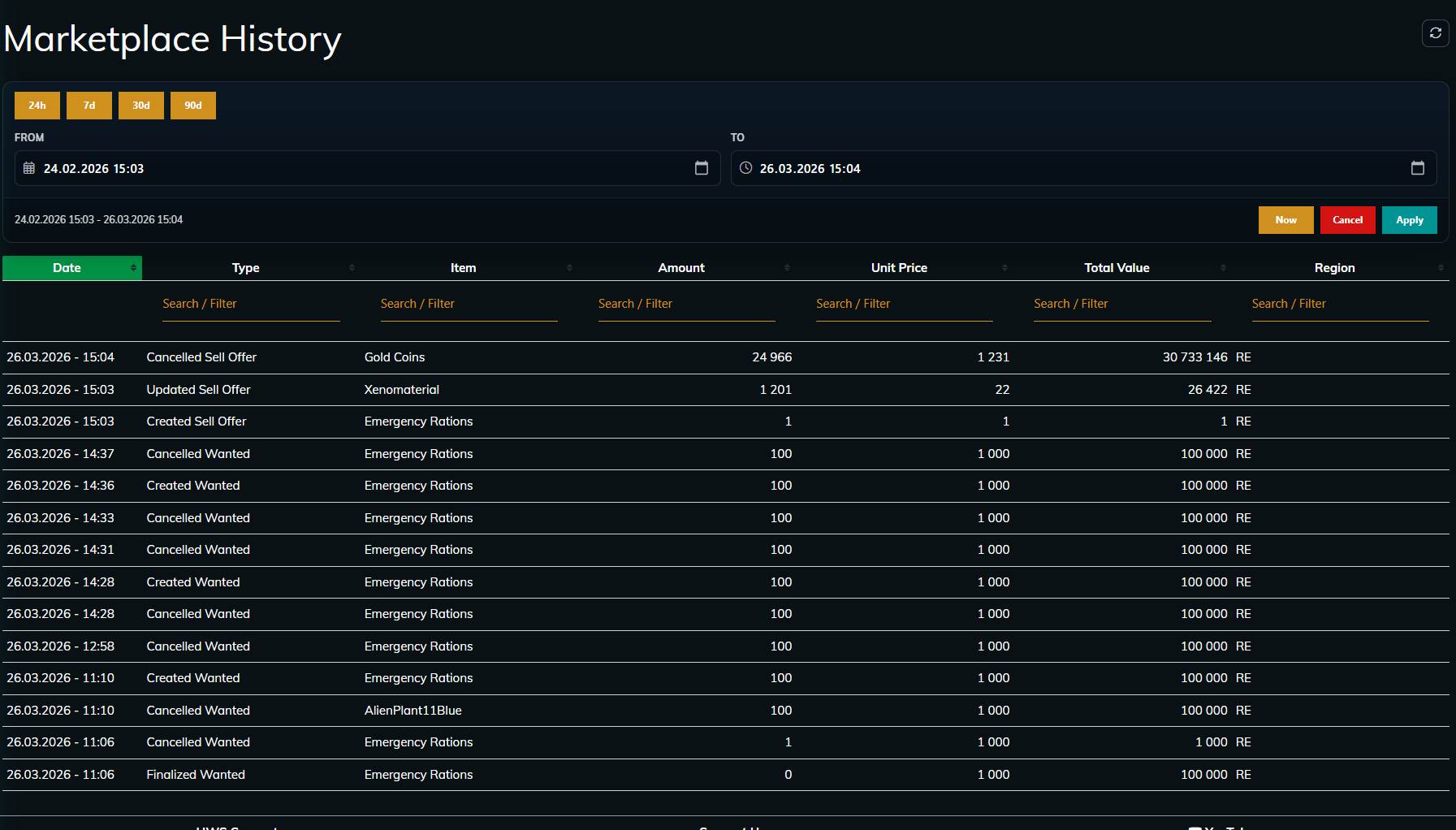
  • New Feature: HWS Marketplace History

    • a new convenience feature for Elite+ Patrons, so they do not have to track all their Marketplace transactions by hand.
  • Finalized the Wanted Feature with a 3 Layer Progression. See the guide for more information how it works:
    HWS Marketplace

All Patrons can access the Wanted Marketplace feature now as Early Access - please provide feedback if possible, so we can have a stable release for everyone.

HWS Connect 5.97.18 Changelog

HWS Connect Event Manager


(example screenshot)

This still needs to be fully tested and polished but in the new season I try to migrate from EAH Event Manager to the new HWS Connect manager!

It is not only visually more attractive for you but will give you even more features than before!

Example for the Battle Royale Event:
After some time, outer house POIs are replaced by dangerous turret POIs, that force you to the center (the Pyramid).

Cross Server Marketplace Feature + Combined HWS Marketplace


  • New Feature: HWS Marketplace Combine and Cross Server Marketplace

    • as per request, Buy / Sell and Wanted offers have no a new column “Server”. The server pair will that way always be visible to you. (HWS RE EU <> HWS RE NA and HWS+ EU <> HWS+ NA). That way you do not need to toggle between the server back and forth all the time to check out the offers from the other server.
    • as Master Patreon you have the convenience benefit on top, to be able to buy offers from the other server, without the need to be online on that server of that offer. This also works for the Wanted feature - so you can fulfill an order from the other server, even though you are not online on that server. :magic_wand:
      I want that CSW should be one of the core feature in the future (and improved further), that’s I think it’s a win-win.
  • Redesigned Sale banner

  • Added fixed / sticky header for marketplace tables

  • merged item icon column everywhere into item name column to safe space

  • Reordered Marketplace columns for better conversion / overview

  • Added Season stats at the top:


HWS Connect+ 6.0.0 Changelog

HWS Connect has been rebuilt from the ground up. HWS Connect+ is a completely new website: new technology, new design, and a lot of new features, while everything you used on the old HWS Connect is still there, usually in a better form.

A huge thank you to Moicky, who wrote most of it: more than 1,600 changes in about one month. :rocket:

Below is what changed for you compared to the old HWS Connect. Questions, bugs and wishes are welcome in this topic or on Discord.

A real website now: links, phones and your own language

The old HWS Connect was one big page that switched content around. HWS Connect+ has a real address for every page and every server (for example /re/market or /rn/ocd).

  • Share a link to any page, bookmark it, open things in new tabs, and the browser’s back button works as expected.
  • One server switcher in the header. Paired servers (RE EU ⇄ RE NA) are always one click away.
  • Made for phones and tablets too: the menu folds into a hamburger menu and the pages adapt to small screens.
  • Available in English, German, French and Russian (language switcher in the header).
  • A clearer sidebar, grouped by topic (Dashboard, Player Info, Marketplace, Players, Structures, Tools …), and you can still reorder it in Settings.
  • Pages load faster, and values like who is online refresh by themselves.

Your settings follow you

The old site kept your preferences in your browser, so a new PC or phone meant starting over.

  • Hot View, watched players, quick-buy amounts, OCD GET lists, sidebar order, assistant hints and privacy options.
  • No Save button: every change is saved instantly.
  • Watched players can now notify you even when the HWS Connect tab is closed (browser push notifications, if your browser allows them).
  • The Hot View can now show live survival bars (Health, Food, Stamina, Oxygen) while you are online.
  • Take the guided tour once and collect 1,000 credits and 10 HWS DNA.

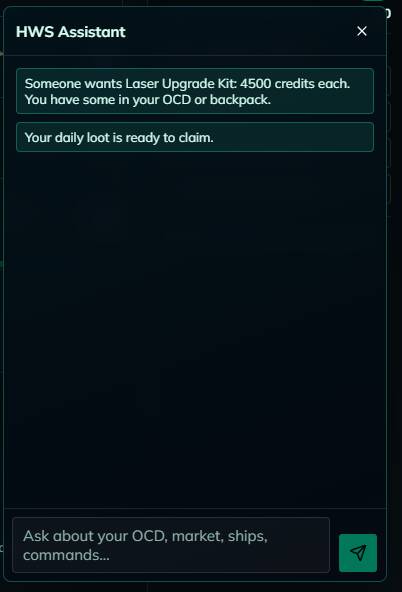
New: HWS Assistant

An AI helper is now built in. Click the chat bubble on any page, or write @ai <your question> in game.

  • Ask about HWS commands, rules, items, the market, the garage or POIs.
  • It can look at your own data (OCD, credits, skills, structures, market listings) to answer things like “what can I sell?”.
  • After you confirm, it can even do some things for you, like upgrading your OCD or buying from the market.
  • It also gives short, helpful hints. You can turn them off in Settings.

New: Tools for builders and planners

A whole new Tools section, all built from the actual HWS server configuration, so the numbers match our game and not vanilla Empyrion:

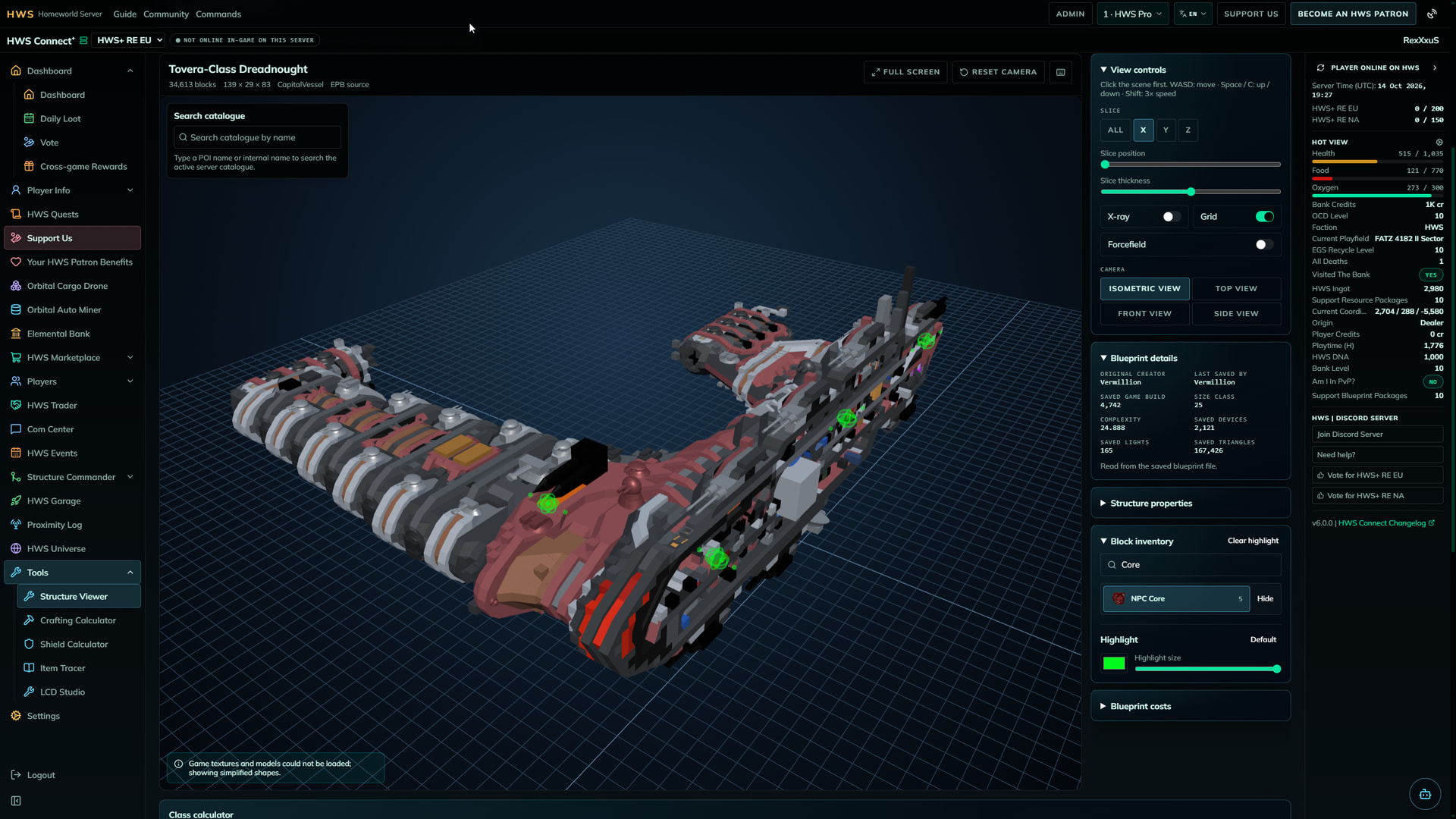
  • Structure Viewer: look at structures in 3D. Open your own blueprint files (they never leave your PC), preview any POI, or open your own and your faction’s live structures and HWS Garage ships. Shows size class, CPU, thrust, fuel and more, estimates blueprint material costs, and can even turn an STL 3D model into a decorative hull blueprint.
  • Item Tracer: everything about an item. Stats, recipes, which NPC traders sell or buy it, loot containers, enemy drops, missions and POIs it appears in. Supporters also see its market sale history.
  • Crafting Calculator: plan what to craft. Raw materials, leftovers, construction steps, crafting time, crop farms, and tips to free up OCD slots.
  • Shield Calculator: plan shield capacity and recharge for your ships.
  • LCD Studio: design LCD and projector screens visually (text, live values, item counts, symbols, pixel art, even pictures) and copy the result into an LCD in game.

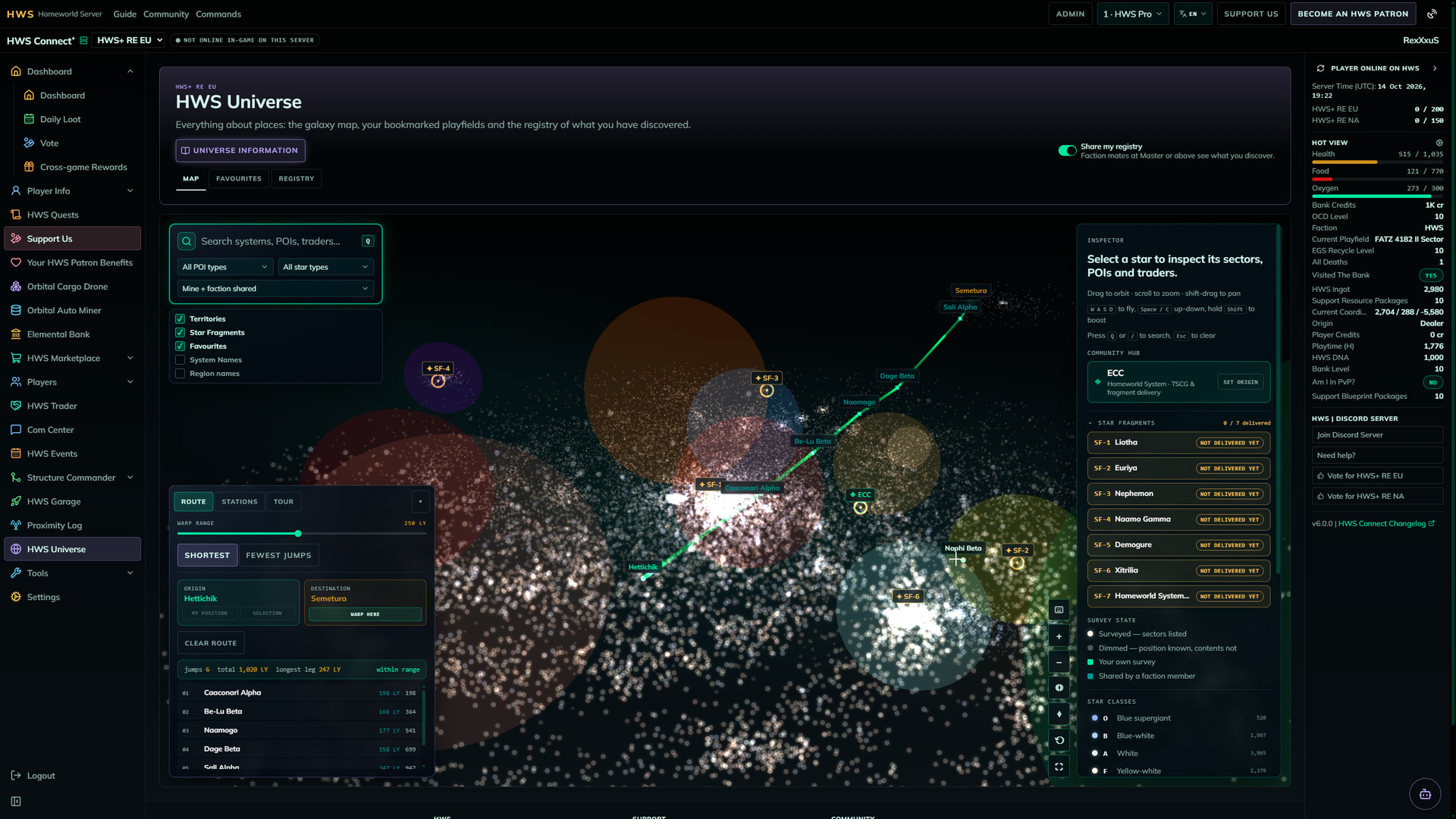
HWS Universe in 3D

The old Universe page was a table. Now it is a 3D galaxy map of our universe:

  • Fly around the map (W/A/S/D), search systems, POIs and traders, and plan routes with the route planner.
  • Favourites with your own notes.
  • The Registry of the systems, playfields and POIs you have discovered in game. Master+ patrons can also read their faction mates’ shared discoveries.
  • Star Fragment locations for the Star Fragment Hunt.
  • Playfield and star names all over the site (structures, garage, OAM, bank tax list …) now link straight into the map.

Everything else, rebuilt and improved

Every page from the old HWS Connect was rebuilt, and on the way we fixed a lot of old bugs and rough edges. Some highlights:

  • New Factions page: every faction on the server with its origin, alliances, members and their roles.
  • Player Stats: the header values that stayed empty on the old site now show up, and the stimpack boosts are labelled with their price and ask before they spend anything.
  • Structure Commander: the 30-day wipe timers, the Manage commands with clear buttons, a 3D button for every structure, and structure thumbnails. EGS Stealth timers on their own tab.
  • HWS Marketplace: Buy / Sell, Wanted and History rebuilt on faster tables with filters, sticky headers and item icons everywhere. The cross-server market for Master patrons is included.
  • HWS Trader: owners edit their traders on “Your HWS Traders” with a live price, and the trader package review got a proper editor.
  • Orbital Cargo Drone, Orbital Auto Miner, Elemental Bank, EGS, HWS Garage, Daily Loot, Vote, Cross Game Rewards, Skill Tree, Quests, Hunter Board, Kill Board, Online Players, Com Center, Proximity Log, HWS Events: all rebuilt, faster and easier to use. Commands sent to the game now show a clear “Sent to game” confirmation.
  • Wide tables show small arrows at the edge. Rest your mouse there and the table scrolls by itself, no more fiddling with tiny scrollbars.
  • The public Patreon tier list is now its own page, so you can compare tiers before you sign in.

Sign-in and safety

  • Sign in with Steam or Epic Games, like before. A sign-in lasts 30 days.
  • We never see or store your password: the sign-in happens on Steam’s or Epic’s own page.

What’s next

Bigger features like the new Event Manager will keep growing from here, and every change from now on gets a short changelog in this topic with the new version number.
Please report anything that looks wrong, especially on the pages you use every day. Thank you for playing on HWS! :heart:

1 Like

HWS Connect+ 6.1.0 Changelog

Thank you for the amazing feedback on the launch of HWS Connect+! Here is everything that changed in the first days since then: new OCD features, the Patreon benefits for the new tools, a smoother Universe map and a lot of fixes from your reports.

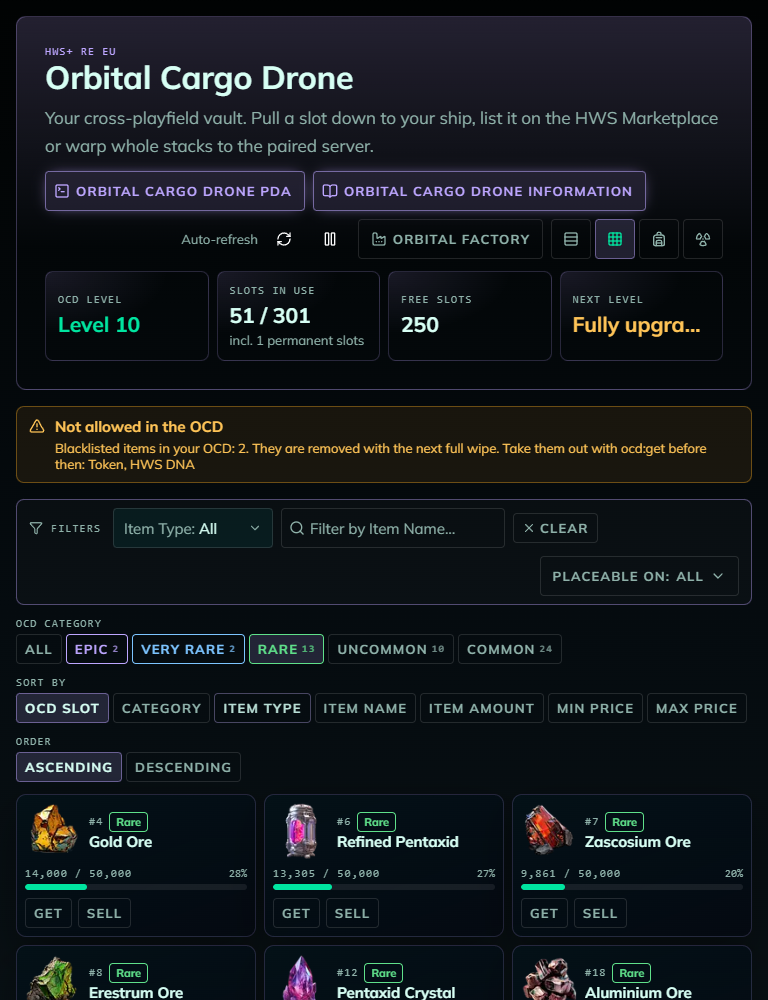
OCD: item categories and blacklisted items

No more looking up the old Google Sheet or hope for the best: the OCD page now shows the OCD category of every item, straight from the game server.

  • Table view: a new Category column (sortable, filterable, and you can hide it like the other optional columns).
  • Grid view: category buttons (Legendary, Ultra Epic, Epic, Very Rare, Rare, Uncommon, Common) with item counts. Click one to see only those items.
  • Backpack view: sort by Category, the category in the hover info, and a coloured border per category (Legendary gold, Ultra Epic red, Epic purple, Very Rare blue, Rare green).
  • Blacklisted items: items the OCD no longer accepts get a :warning: warning badge in every view, and a notice at the top lists them. They are removed automatically with the next full wipe, so take them out with ocd:get before then.
  • “Amount / Max” always matches the item’s category.

Details in the updated Orbital Cargo Drone guide.

Patreon benefits for the new tools

The new tools turned out to be very popular, and hosting them costs a lot more than the old HWS Connect did. So a few of the most powerful parts are now Patreon benefits. Everything else stays free:

  • Structure Viewer: block inventory, blueprint costs and the catalogue search are HWS Elite+, importing an STL hull is HWS Master+. Viewing your own structures stays free.
  • Item Tracer: loot containers and enemy drops, and the NPC traders of HWS items are HWS Elite+. PDA missions and the minimum/maximum NPC prices are HWS Master+.
  • LCD Studio: designs with more than one layer are HWS Elite+. The first layer, templates and shared designs stay free.
  • A locked area shows a blurred preview with a Locked button that tells you which tier unlocks it. Close that window and the area stays hidden until you sign in again.
  • The Patreon window now opens on every page where you click something locked, instead of popping up later on another page.

:information_source: I heard you loud and clear about the Marketplace filters: since I added bunch of new stuff, I reconsidered my unpoplar decision about the marketplace filters and made them available for everyone now

See all tiers on the new Patreon tier page and the overview in the HWS Connect guide.

Orbital Factory and OCD improvements

  • Orbital Factory: a new Show only craftable switch hides every item your OCD’s materials can’t cover, and Craft max fills in the largest amount you can craft.
  • Placeable on filter (CV, SV, HV, Base) for the OCD and the factory picker.
  • Smelted ingots now have their own Ingot item type, so you can filter for them.
  • Backpack view: clicking one staged stack puts back only that stack.
  • Factory overflow is now explained correctly: what doesn’t fit into your OCD is delivered in game when you are online.

HWS Universe map

  • Every map panel (search, layers, inspector, system bodies) can now be collapsed on desktop too, not only on phones. The zoom buttons move to the corner while the inspector is collapsed.
  • The map no longer slows down to a few frames per second when System Names are switched on.
  • Old favourites from your browser can be deleted directly from the map.
  • Phones: the inspector no longer overlaps the map, and map tooltips are hidden.

Smaller changes and fixes

  • Skill Tree: you can now choose a skill while you are offline.
  • Vote: the page checks the vote site every 15 seconds and claims your reward automatically. If you are offline, the reward waits and arrives the next time you are online.
  • Daily Loot: fixed players receiving their Daily Loot (especially the Patreon auto daily loot) two or three times.
  • Rewards: fixed a game client crash when a reward contained the photonic turret or gun weapons.
  • Marketplace: sorting and filtering by unit price now use the discounted price you see.
  • HWS Trader: items that can’t be part of a package (blacklisted items, and weapons, blocks and devices nobody can craft) are hidden in the item picker and flagged in your package.
  • HWS Garage: your Patreon garage discount is now added to your origin discount.
  • OAM backpack: a real bag + toolbelt inventory like on the OCD, with the volume and a resizable split.
  • Player Stats: PvP kills and deaths now show your own numbers.
  • Dashboard: “Am I in PvP?” shows a dash when the game doesn’t know, instead of “No”.
  • Com Center: message times in your own time zone, and messages written on the website show the sender’s name instead of “Unknown”.
  • HWS Assistant: the chat window can be resized (drag the grip in its header, double-click to reset). @ai in Server chat is answered privately to you, the assistant remembers what it already did in the conversation, and it no longer sends empty answers.
  • Structure Viewer: saved blueprints from your library open only when you click them.
  • Item icons load much faster, and links to HWS Connect have a new share image.

Questions, bugs and wishes are welcome in this topic or on Discord. Thank you for playing on HWS! :heart:

HWS Connect+ 6.2.0 Changelog

This update makes the Orbital Factory easier to understand and adds new limits so it only crafts items you can access. I also fixed a couple of confusing Marketplace messages and improved the upgrade answers from the HWS Assistant.

Orbital Factory: clearer upgrades and smarter crafting limits

Factory upgrades now do more than add speed and parallel crafting slots: each level also raises the item tier the factory can craft. The factory checks your player level too, and items unlocked through an in-game dialogue must still be crafted in game.

  • The picker shows item tiers and explains which factory level is needed for locked items. The factory panel also shows your player level and the highest tier you can craft.
  • Your player level now limits both the item you queue and any components the factory might craft along the way.
  • The upgrade confirmation shows your Credits and HWS DNA before and after paying. You can’t confirm while your balance is loading or if you can’t afford the upgrade.
  • The OCD page now has a feature card explaining the factory, with a button to open it. Close the card if you don’t need it; your choice is remembered in your browser.
  • Orbital Factory levels start at 1 each season.

Smaller changes and fixes

  • HWS Assistant: upgrade-cost answers for the OCD, OAM, EGS and Elemental Bank now use HWS upgrade information, including what each level provides.
  • Marketplace history: rows now show the item that was traded instead of “Container”.
  • Marketplace: the message for a buyer who is offline now correctly says they must be online on the offer’s server, rather than suggesting the server is offline.

Questions, bugs and wishes are welcome here or on Discord. Thank you for playing on HWS! :heart:

HWS Connect+ 6.3.0 Changelog

This update adds an OCD Categories list so you can check an item’s category before storing it, and makes Orbital Factory information easier to find.

OCD: check item categories before storing

The new OCD Categories button opens a searchable list of items and their OCD categories, helping you see how much of an item fits in one OCD slot.

  • Search by item name, developer name or ID, or filter the list by category. If category data isn’t available, the list tells you instead of showing incorrect categories.
  • The Orbital Factory view now has an Orbital Factory Information button that opens the factory section of the OCD guide.
  • The PDA and information buttons have shorter labels across the OCD, OAM and EB pages.

Smaller changes and fixes

  • Orbital Factory item-price thresholds for assigning tiers to materials can now be adjusted per server. The existing thresholds remain unchanged.

Questions, bugs and wishes are welcome here or on Discord. Thank you for playing on HWS! :heart:

HWS Connect+ 6.4.0 Changelog

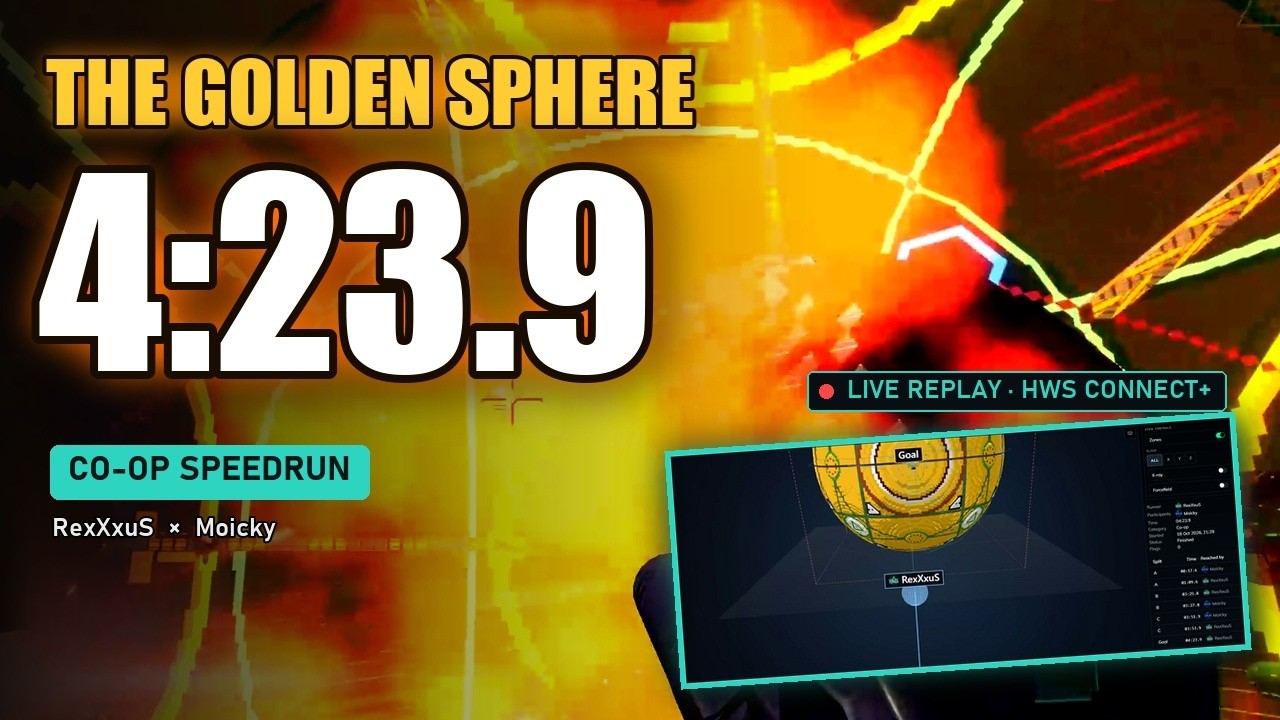
This update brings speedruns to HWS Connect+, adds map routes you can follow in game, and makes the Orbital Factory’s recipes easier to understand. There are also changes to Daily Loot and reward delivery.

Speedruns: race, replay and follow your progress

Start a run at an enabled POI and race through its course. You can join a runner, check your status or cancel your participation with the in-game speedrun commands; /speedrun opens a help popup.

  • Checkpoints must be passed by each player in order. The run finishes when the runner reaches a goal and everyone still in the run has completed the checkpoints.
  • The 3D replay shows player routes, movement and splits, and lets you play, pause, scrub and follow a player. You can also see when someone died and respawned. Course zone shapes are visible to admins; players still see checkpoint and goal labels and checkmarks.
  • Your in-game map points to your next checkpoint, then the goal. Joined players keep their own progress, and the bookmark clears when their run ends or they cancel.
  • Boards show player avatars, and each POI’s podium shows the prizes for the selected solo, co-op or group category. Some prizes can include items delivered to your OCD.
  • Use Request a speedrun POI on the board to suggest a course and add a note. You can make up to five requests per UTC day; duplicate open requests don’t use up a request.

Universe map: plan routes and follow them in game

The Universe map now has a Routes panel for creating and sharing named routes through systems, sectors and POIs. Start a route to follow its stops in game, or open its link in the Steam overlay to keep track as you travel.

  • Add stops from the map or Registry, or generate a route from Registry POIs within a distance you choose.
  • Share routes with your faction. An active route is drawn in blue on the map.
  • Starting a route puts a bookmark on your current stop in game. You’ll get a toast as you reach a stop; skip a stop or end the route whenever you like. If bookmark syncing needs a token, the page explains how to send one.
  • The old Stations and Tour panels are replaced by Routes; the old Route tab is now Warp.

Orbital Factory: see the recipe and what’s missing

The craft panel now shows an item’s in-game recipe as a tree, so you can see what each ingredient is made from as well as what you still need to gather. The items the factory crafts, consumes and delivers have not changed.

Smaller changes and fixes

  • Daily Loot: you can claim one box per calendar day (Berlin time), always receiving the next box in the sequence. If you miss a day, that box is still next; Patreon auto-loot also claims one box a day instead of catching up with several at once.
  • Rewards and trading: while you’re in Cross Server Warp, rewards wait until you leave, and the HWS Trader and Marketplace won’t trade there. Cross Server Warp is also no longer offered or accepted as a player-event arena.
  • Speedruns: the Speedruns navigation link only appears when the server has an enabled speedrun POI.
  • Speedruns: starting a run now gives a clear message if the game connection isn’t ready.

Questions, bugs and wishes are welcome here or on Discord. Thank you for playing on HWS! :heart:

HWS Connect+ 6.5.0 Changelog

This update adds trade routes to NPC sellers, makes the Orbital Factory handle a full OCD more safely, and brings a fresh look to the Skill Tree. Pages also remember your view, and there are improvements to the Garage, OCD, player stats and more.

Item Tracer: build a route to NPC sellers

If an NPC sells an item, you can now use Build trade route on its Item Tracer page to create a route through the POIs in your Registry that sell it. The route is ready to start in HWS Universe.

  • Available to HWS Elite+. For HWS items, the existing HWS items access is also required.
  • The route is named Buy <item> and uses your selected route settings, such as maximum stops and shortest route or fewest jumps.

Orbital Factory: wait for OCD space instead of using Lost & Found

Items from the factory no longer go to Lost & Found when your OCD is full. Anything that doesn’t fit waits until space opens up, including refunds from cancelled or failed jobs.

You’ll see what’s waiting in the factory job list and on the OCD page. Waiting jobs have finished crafting and don’t occupy a factory slot, but they still count toward your job limit.

  • If the preview shows that the output might not fit, you can choose whether to queue the craft anyway.

Skill Tree: a clearer, refreshed tree

The Skill Tree now has a glowing sci-fi look, with clearer states for picked, available and locked branches. The day-cycle rail also makes your progress and the next cycle easier to check.

  • Branches you can assign a point to stand out in both tree and list views.
  • Hovering over a branch no longer shifts the tree, and long labels in the phone-friendly list view wrap instead of overflowing.

Garage: see what makes a ship special

Use the new Info button on a ship for a breakdown of blocks that exceed build limits or aren’t placeable on that ship class.

Pages remember your choices

OCD, OAM, structures, garage, skill tree, inventory, Universe map, calculators, speedrun replays and most tables now remember your view, sort and filters in your browser. Come back to the page and it opens with your saved choices instead of resetting to the default.

OCD: clearer item details and safer backpack staging

  • Blacklisted items now have their own Not allowed tab in OCD Categories, so you can search for them without scrolling through other categories.
  • In backpack view, hovering an OCD item shows its fill against the category cap. The inventory-side tooltip still shows the move preview.
  • Sending staged items clears the pickup, and staging can no longer leave ghost stacks behind if an OCD slot changes or empties.

Smaller changes and fixes

  • Player stats: your sheet now shows the Base, Skills and Survival breakdown for maximum HP, stamina and food. Maximums stay in sync with skills, survival bonuses and active stimpacks.
  • AI helper: suggestions are on by default. Type co:off:AIS to turn them off; your website settings for individual hint types still apply.
  • Marketplace and credits: sort offers by Auto Discount, see exact credit amounts on hover, or choose Show exact credits in Settings to display whole numbers across the site. Opening an offer’s chart no longer resets the listing or scroll position.
  • Speedruns: the bookmark sync token now arrives in your backpack as soon as you start or join a run, and fast jetpack climbs and falls no longer appear as jumps in replays.
  • Actions: fixed an issue that could show “Something went wrong” after an action such as claiming Daily Loot, even when it had succeeded.

Questions, bugs and wishes are welcome here or on Discord. Thank you for playing on HWS! :heart:

HWS Connect+ 6.6.0 Changelog

This update brings Cross Server Warp to Connect+, refreshes open pages after many in-game commands, and makes Skill Tree day navigation easier. There are also fixes to EGS quotes, OCD warp space and more.

Cross Server Warp: start and follow your transfer in Connect+

The new Cross Server Warp page shows your backpack, ships, crew and warp cost before you start, then follows each step of the transfer live. You can start from either region, see where you are online, and Connect switches to the destination when it’s time; your ships appear as interactive 3D models along the way.

  • The page explains blockers and what to do at each stage, including when to switch servers or answer the in-game confirmation.
  • Cross Server Warp needs supporting EAH updates on both regions.

Open pages refresh after in-game commands

When you run a command that changes your data, your open Connect+ tab now refreshes automatically after the game has had time to process it. This also covers confirmations and item exchanges, and an eb:send refreshes the recipient’s tab too; read-only commands won’t trigger a refresh.

Skill Tree: jump straight to a day

Click a day on the rail to glide to its fork in the tree or list, then watch the destination pulse so it’s easy to spot. The Next free skill button uses the same navigation, and the rail also works with your keyboard.

EGS: quotes now match the game

Ship Jump previews now use the game’s straight-line distance and Pentaxid rounding, and block jumps under 2,000 m before you send them. The BP Factory time quote also now shows the HWS DNA amount the game actually charges.

Smaller changes and fixes

  • OCD Warp: the slots-in-use and free-slots cards now also show the paired server’s numbers, so you can check destination space before choosing stacks.
  • Daily Loot: the claim checklist now reminds you to leave the Cross Server Warp sector before claiming, since loot won’t be delivered while you’re still there.
  • Long pages: a back-to-top button appears as you scroll down and glides you back up.
  • HWS Assistant: OCD level 6 is now quoted at 600 HWS DNA.
  • Sidebar: Cross Server Warp appears under HWS Universe in your saved sidebar order too, without rearranging the order you chose.

Questions, bugs and wishes are welcome here or on Discord. Thank you for playing on HWS! :heart:

HWS Connect+ 6.7.0 Changelog

This update gives you more control over both sides of OCD Warp and makes structure-wipe alerts available to everyone. It also clears up a few confusing locked actions and settings.

OCD Warp: filter and sort the TO server too

You can now filter and sort the TO server’s projected slots independently from the FROM server. Your choices are remembered separately, and previews sort as the stacks that will land there.

Structure wipe alerts are free for everyone

Every player can now enable wipe alerts and choose how many days ahead to be notified before the 30-day inactivity wipe.

Smaller changes and fixes

  • Cross Server Warp: the crew hint now clarifies that only nearby members of your faction warp with you.
  • Online Players: Whisper Player and Send Credits now show a lock and explain that they’re Survivor Patreon features. Selecting either opens the Patreon upsell.
  • Settings → Privacy: if CSV downloads are hidden, you can turn them on right there and the download buttons appear straight away. After requesting data deletion, Connect+ also tells you what to do if your mail app didn’t open.
  • EGS: the Starter Planet card is hidden for now because the game cannot complete that action yet.

Questions, bugs and wishes are welcome here or on Discord. Thank you for playing on HWS! :heart: