The Com Center brings your faction chat to the website: read what your faction mates write in game and answer them from your browser or phone, without being in the game. It also holds your Inbox with messages from the HWS team.
 HWS Connect → Com Center (NA players:
 /rn/com-center)
 How it Works
- Sign in to HWS Connect and select the server you play on
- Open Com Center in the menu
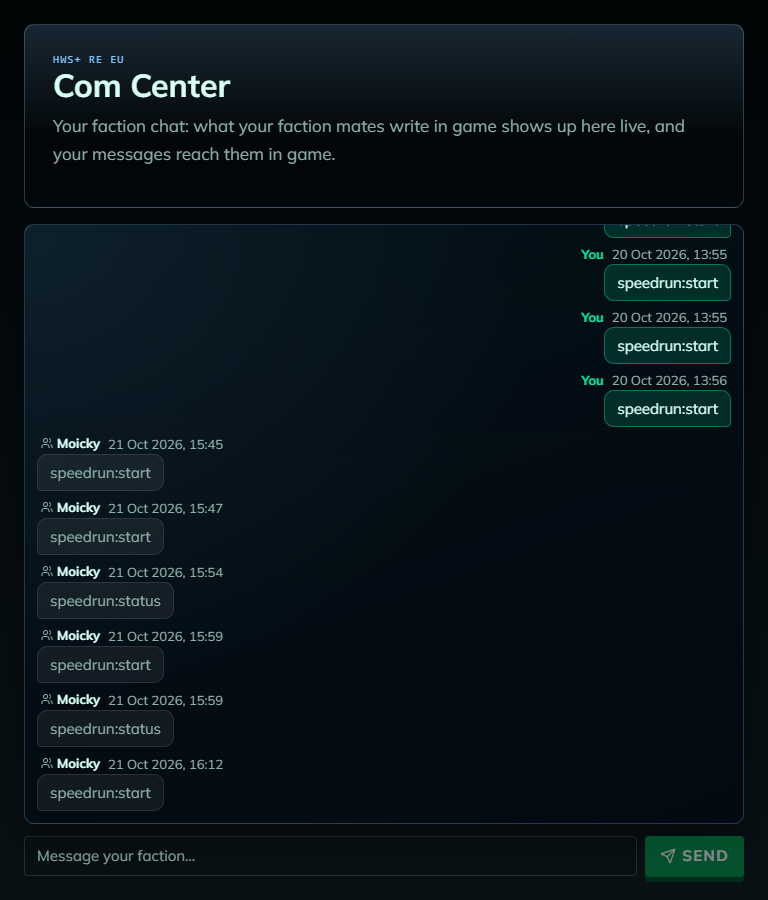
- Your faction’s chat of the last 7 days appears and updates itself every few seconds
- Type into Message your faction… and press Send (or Enter)
- Your own messages are on the right (You), your faction mates’ on the left with their name and time. Lines you typed in game show up here too
- In game, a message from the website arrives in the Faction channel as a SERVER message with your name in front, e.g.
PlayerName: hello everyone - Max. 500 characters per message. Free for everyone
Only your faction channel is shown: no global chat, alliance chat or private messages. Other factions can never read your faction chat here.
 Inbox
Inbox
- Messages from the HWS team about your purchases land here, e.g. where your new HWS Residence is. The Inbox shows only when you have messages
- The envelope right of your Steam picture at the top of the site shows a red dot while a message is unread. Click it to jump to the oldest unread one
- Click a message to open it (that marks it read), or use Mark all read. With browser notifications on, you also get a push
- Messages come in your site language. You don’t need to open a ticket for what they tell you
 Requirements
- You must be signed in (the faction chat also needs a player faction on that server). Just joined a faction? It can take about a minute to show up
- You don’t need to be online in game
- Each server has its own faction chat
 Common Messages
- “Faction chat is only for faction members…”: you are not in a faction on this server (or just joined one). Wait a minute and reload, and check the server selector.
- “No faction messages in the last 7 days.”: nobody in your faction wrote in faction chat this week.
- “Lost the connection to the chat. Retrying…”: the page retries by itself.
- “The game service did not confirm the command. Check in game before sending it again.”: your message may already have arrived. Check the in-game chat first, to avoid a duplicate.