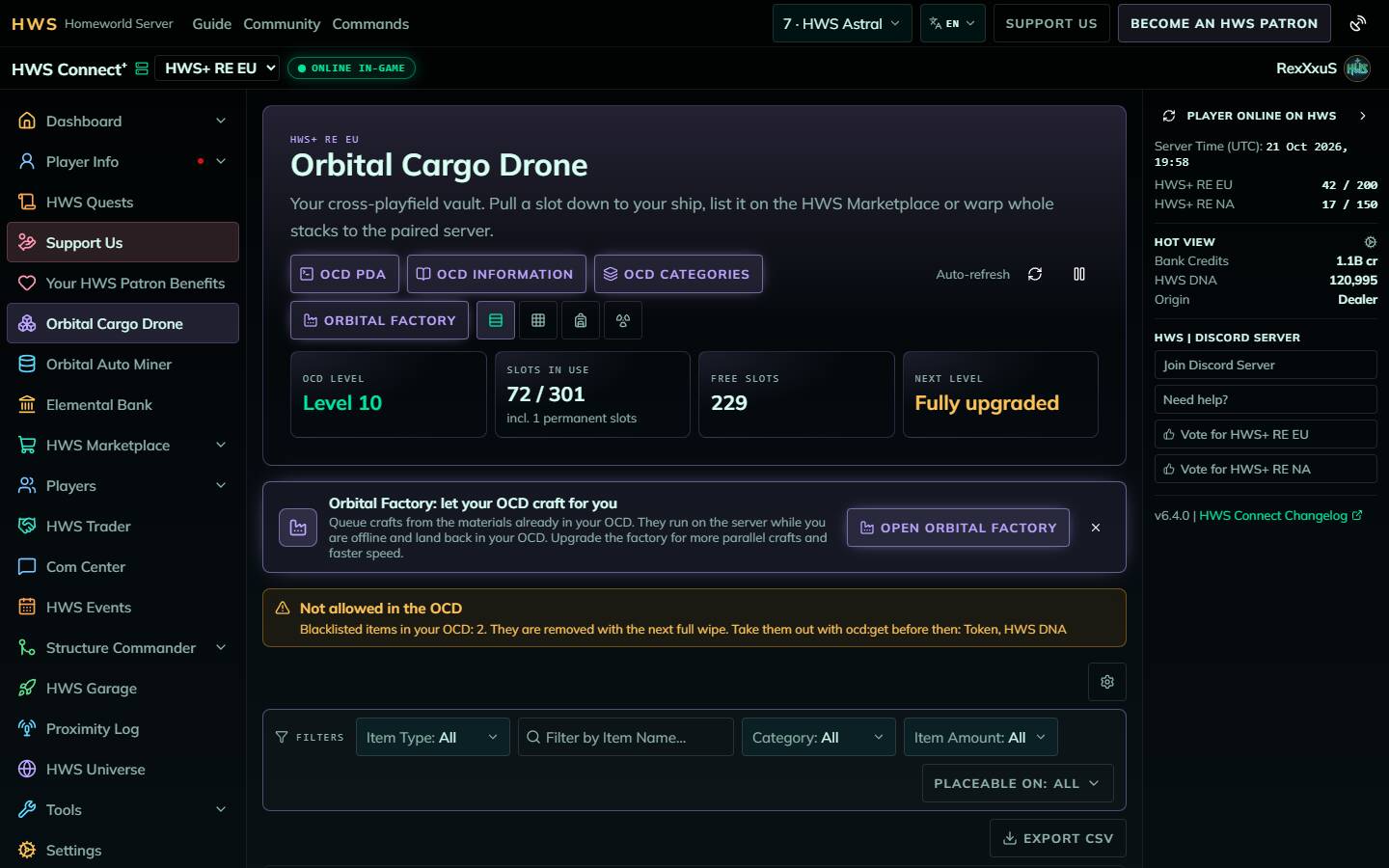
The Orbital Cargo Drone (OCD) is one of the most powerful features offered exclusively by HWS. It is a virtual cargo box that stores your items safely and persists across wipes. You fill it in game and manage it in game or on HWS Connect (NA players: /rn/ocd), where you can also sell items on the Marketplace, warp stacks to the paired server and craft with the Orbital Factory.
Damaged weapons, armors, boosters inside armors and trade commodities cannot be stored at any OCD level.
 Introduction Video
This video shows the previous HWS Connect. The screenshots in this guide show the current site.
 Putting Items into your OCD
Items only get into the OCD from the game:
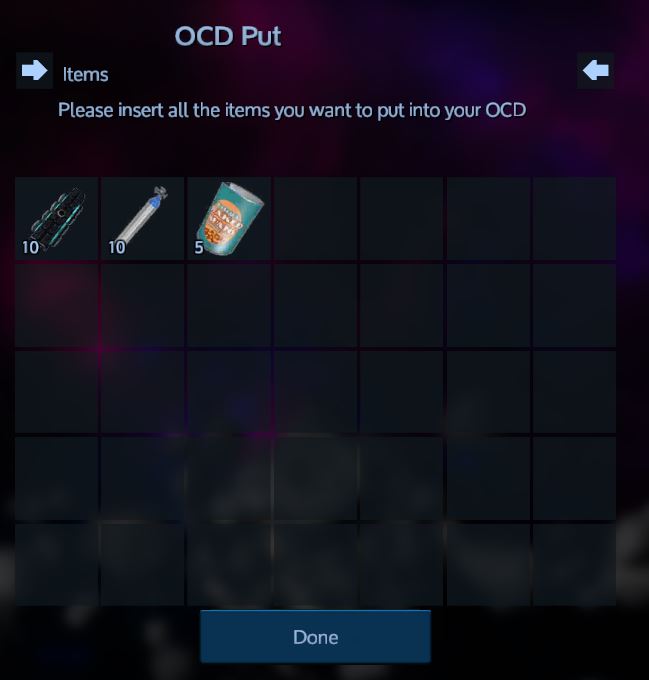
- Type
ocd:putin faction chat to open the OCD Put window, insert all items you want to store and click Done - Or use
ocd:put:x, wherexis your toolbar slot number. Example: 999 Fusion Cells in slot 1 and 500 in slot 2 → typeocd:put:1, wait 10 seconds, typeocd:put:2
The OCD PDA button on the website sends these in-game actions for you: upload specific items, upload your whole backpack, clean up empty slots, swap two slots and upgrade your OCD level.
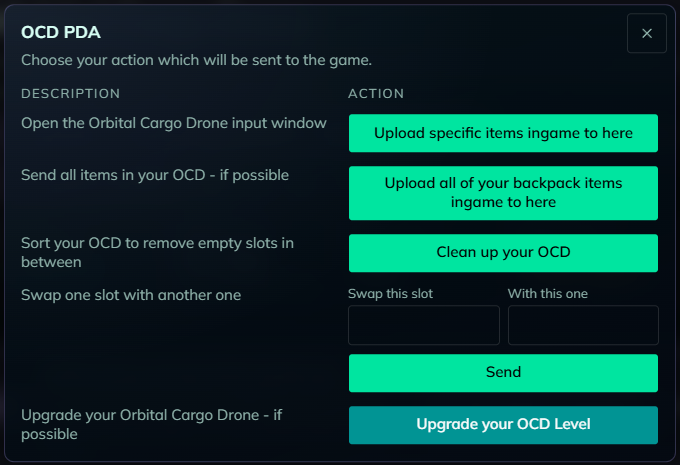
 OCD Commands
Visit cmd.hws.global, open your PDA > Guide > HWS Commands, or type ocd:? in game to see all commands.
Additional commands and features are available to HWS Patrons!
 The OCD on HWS Connect
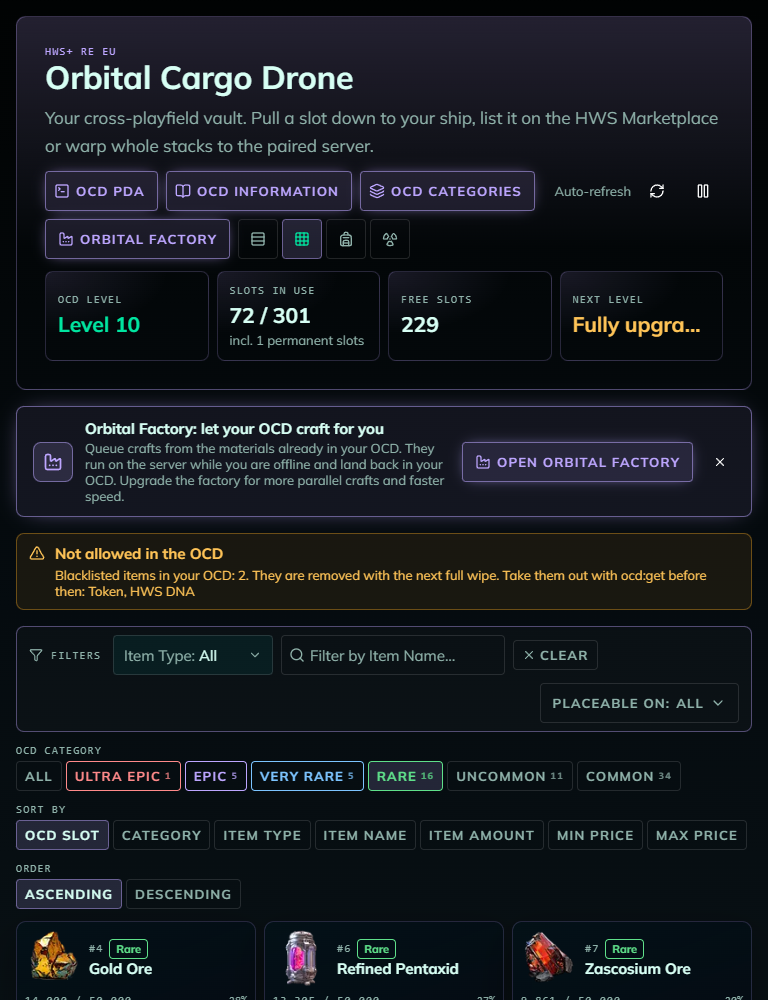
The header shows your OCD level, slots in use, free slots and the price of your next level (you upgrade in game with ocd:upgrade). Four views are available, and your browser remembers the one you picked:
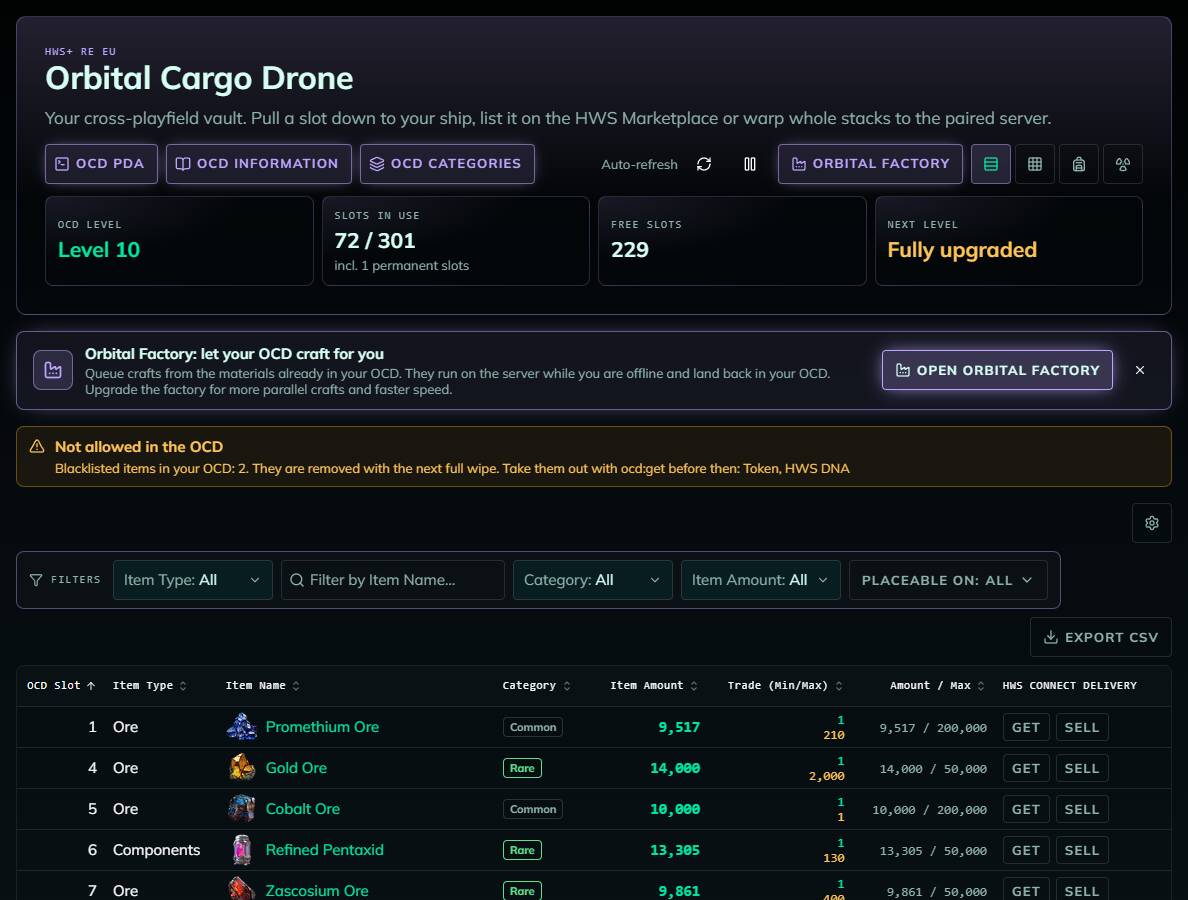
Table view
Slot, item type, item name (links to the item on the Marketplace), amount, Trade (Min/Max) prices, Amount / Max (how full the slot is for that item’s rarity at your OCD level) and the Get / Sell buttons. The gear icon hides columns; you can sort and export to CSV.
Grid view
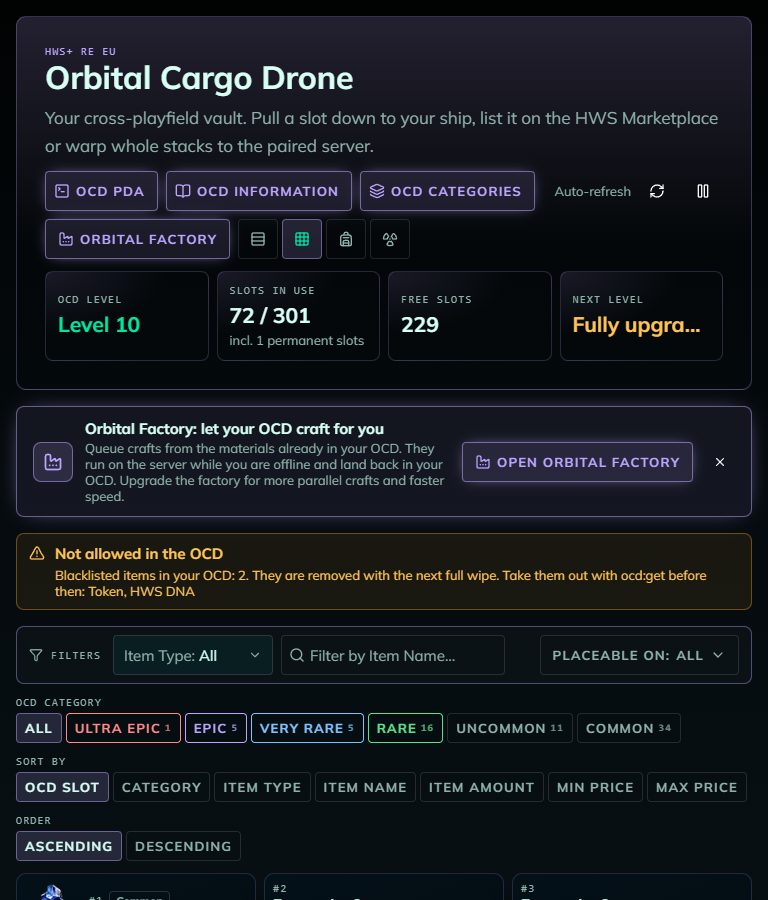
The same slots as cards. The fill bar turns amber at 90% of the slot cap and red when full.
Backpack view: build a pickup from several slots
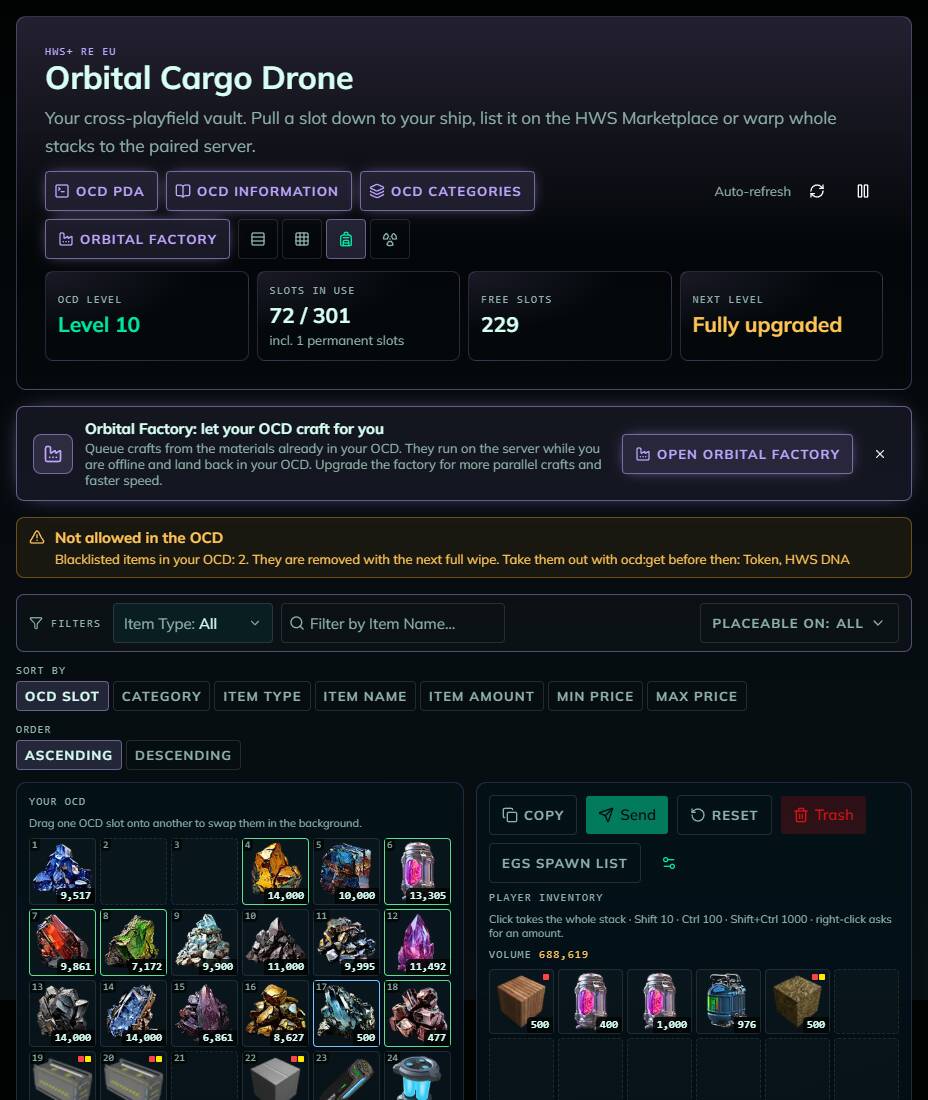
Your OCD on the left, your player inventory on the right. Click items to stage them for pickup:
- Click = whole stack · Shift = 10 · Ctrl = 100 · Shift+Ctrl = 1000 · right-click = exact amount
- The page works out where the items will land in your inventory and tells you when nothing more fits
- Send delivers everything with one command, Copy copies that command so you can paste it into game chat, Reset / Trash only clear the pickup (they never delete OCD items)
- Drag one OCD slot onto another to swap them
- Hover over an item to see its OCD category and how full its slot is (amount / max)
- GET lists: save up to 5 kits (e.g. “100x Fuel, 10x Oxygen”) in Settings → OCD and stage them with one click
Get: deliver one slot
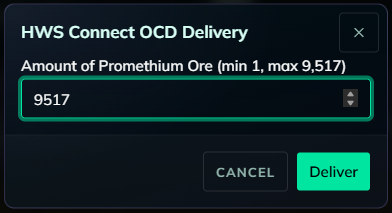
Click Get, enter an amount and click Deliver. The site sends the same command you could type yourself (e.g. ocd:get:12*500).
Get, Send and slot swaps need you to be online in game on that server. Like
ocd:getin game, a delivery usually only works inside an OCD Zone (see below).
 Patron Benefits on HWS Connect
| Feature | Tier |
|---|---|
| Table / grid filters | HWS Pro+ |
| Item sale-history charts | HWS Veteran+ |
| Trade (Min/Max) Marketplace prices for your items | HWS Elite+ |
| Sell items straight from your OCD to the HWS Marketplace | HWS Elite+ |
| OCD Warp to the paired server | HWS Elite+ |
| Extra Orbital Factory craft slots | HWS Elite+ (+1) up to Astral (+4) |
Sell from your OCD
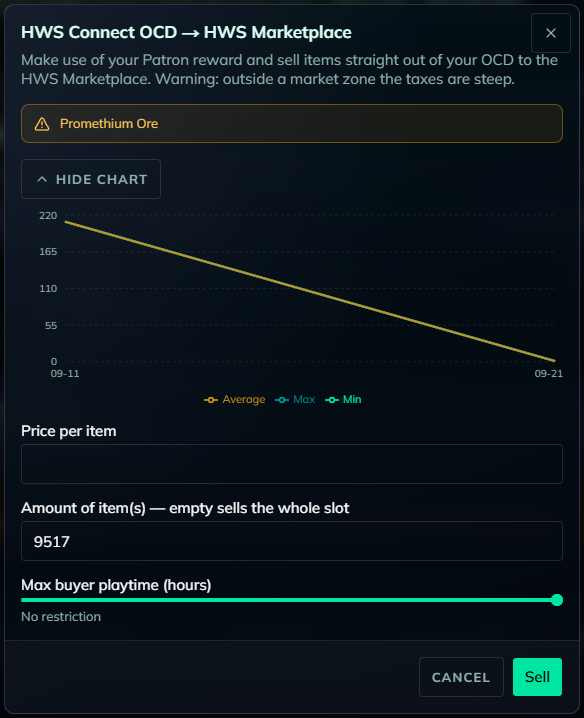
Click Sell, enter a price per item, an amount (empty = whole slot) and optionally a max buyer playtime (only players with less playtime can buy, beginner-friendly). The dialog shows the item’s price history.
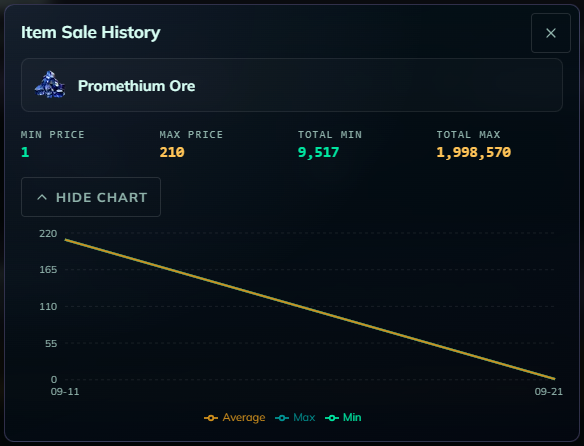
Click a Trade (Min/Max) price to see the item’s sale history and what your whole slot is worth:
OCD Warp
Move whole stacks to your OCD on the paired server (RE EU ↔ RE NA):
- Open the OCD Warp view
- Select the stacks on the FROM side. The TO side shows your OCD on the other server, and the Slots in use / Free slots cards add the other server’s numbers on a second line (e.g. “RE NA: 261”), so you see how much room the destination has
- Click Initiate warp!, then Start warp!. Don’t touch either OCD until “Warp complete” appears, and don’t retry while it is processing

- Highly experimental. Use at your own risk.
- You must have been active on both servers recently.
- Matching stacks in the target OCD are filled first, then empty slots. Stacks are split to respect the target’s slot caps, and the whole selection must fit.
- The warp itself costs nothing.
 Orbital Factory (OCD Crafting)
The Orbital Factory crafts items on the website from the materials in your OCD and puts the result back into your OCD. It keeps crafting while you are offline, and it is a quick way to get a part you need right now (pull it from the OCD in game when it is done). Open it with the Orbital Factory button on the OCD page or the Orbital Factory card above your OCD. While it is open, Orbital Factory Information shows this guide section right on the website.
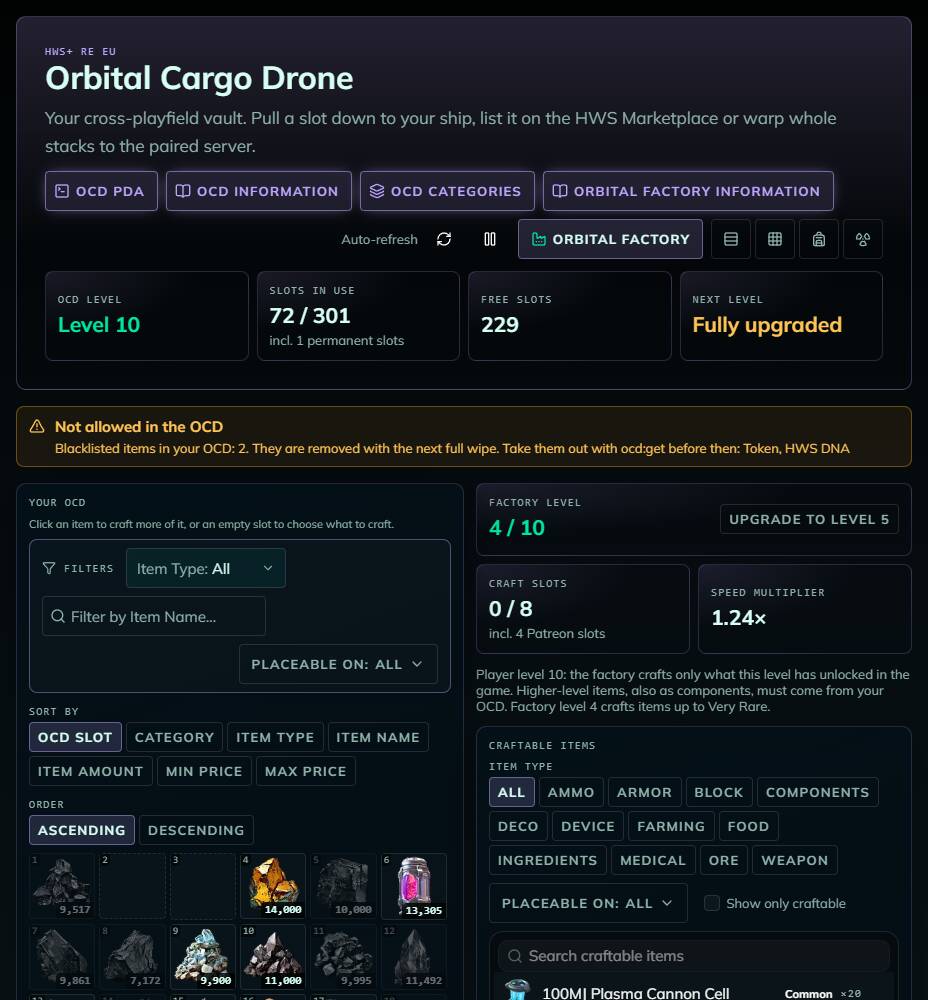
What you can craft
The factory follows the game’s progression. An item is offered only when all three of these are true:
- Your player level has unlocked it. Every item has an unlock level in the game (the tech tree level). Items above your level are not offered, also not as parts of a bigger craft.
- It is not unlocked through a dialogue. Items you unlock in game with a schematic or an NPC dialogue (for example the LX-2 Thor Experimental Railgun) can never be crafted in the factory, even after you unlocked them. Craft those in game.
- Your factory level reaches the item’s factory tier (see below).
The panel shows your player level and the highest tier your factory crafts. The list of craftable items shows each item’s tier. Items your factory level is too low for are greyed out with the factory level they need.
Factory tiers
Every item has a factory tier. It follows the item’s unlock level in the game. Parts and materials without an unlock level get their tier from their market price, so an expensive component is not “Common”. The HWS staff set these price thresholds and may adjust them; the table shows the current values.
| Factory tier | Items with unlock level | Parts without unlock level (market price) | Factory level needed |
|---|---|---|---|
| Common | 1 or none | under 1,000 CR | 1 |
| Uncommon | 3 | 1,000+ CR | 2 |
| Rare | 5 | 10,000+ CR | 3 |
| Very Rare | 7–10 | 25,000+ CR | 4 |
| Epic | 12–15 | 100,000+ CR | 6 |
| Ultra Epic | 20 | — | 8 |
| Legendary | 25 | — | 10 |
If a recipe needs a part above your player level or factory tier, the factory does not craft that part: it has to be in your OCD already (it shows up as Missing in the preview).
How to craft
- Click an OCD item to craft more of it, or an empty slot to choose from Craftable items (with search and item-type filter)
- Enter an amount. The preview shows how many batches you get (whole batches only, so you may get more than you typed), the materials (Need / Have / Missing) and the duration
- Click Queue craft. The materials are taken from your OCD right away
- Follow your crafts in the Crafts list (Queued, Running, Delivering, Done …)
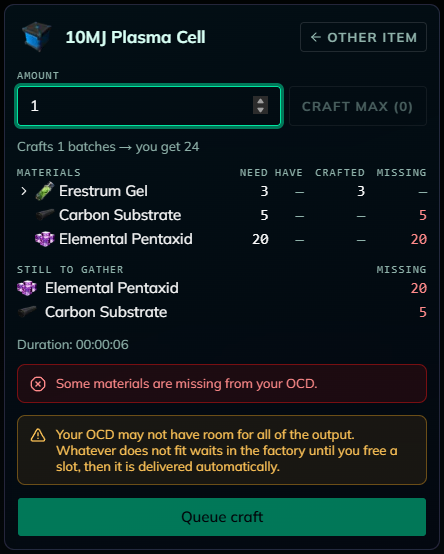
- Like the in-game constructor, intermediate parts are crafted from your OCD contents automatically (within your levels, see above). Base resources and refined materials (ores, ingots …) are never crafted and must already be in your OCD.
- Only items players can craft in a constructor on that server are available.
- Full OCD: what doesn’t fit into your OCD waits in the factory (“Waiting for OCD space”) and is put into your OCD automatically as soon as a slot is free. The OCD page shows a notice for waiting items. If the preview says the output may not fit, Queue craft asks you first. Refunds of cancelled crafts wait the same way. Nothing from the factory is ever delivered in game.
- Show only craftable hides every item your OCD’s materials don’t cover, and Craft max fills in the largest amount you can craft right now.
- The preview shows the recipe as a tree (click ▸ to open a part) and a Still to gather list of everything that is missing.
- Cancel: a queued or running craft can be cancelled, and all its materials go back to your OCD (not after a speedup).
- Speed up: finish a running craft instantly for 1 HWS DNA per started 10 minutes left.
Factory levels
You start every season at level 1 (1 craft slot, Common items). Click Upgrade to level N in the factory header to upgrade. The upgrade window shows your Credits and HWS DNA now and what is left after the upgrade, and which new tier the level opens.
| Level | Craft slots | Speed | Highest tier | Upgrade cost |
|---|---|---|---|---|
| 1 | 1 | 1.00× | Common | — |
| 2 | 2 | 1.08× | Uncommon | 10,000,000 CR + 100 HWS DNA |
| 3 | 3 | 1.16× | Rare | 20,000,000 CR + 200 HWS DNA |
| 4 | 4 | 1.24× | Very Rare | 35,000,000 CR + 300 HWS DNA |
| 5 | 5 | 1.32× | Very Rare | 50,000,000 CR + 400 HWS DNA |
| 6 | 6 | 1.40× | Epic | 70,000,000 CR + 550 HWS DNA |
| 7 | 7 | 1.48× | Epic | 95,000,000 CR + 700 HWS DNA |
| 8 | 8 | 1.56× | Ultra Epic | 125,000,000 CR + 900 HWS DNA |
| 9 | 9 | 1.64× | Ultra Epic | 160,000,000 CR + 1,150 HWS DNA |
| 10 | 10 | 1.75× | Legendary | 200,000,000 CR + 1,400 HWS DNA |
Patreon bonus craft slots: HWS Elite +1, Master +2, Meta +3, Astral +4. Example: factory level 3 + Master = 5 crafts at once. The bonus adds slots only, not tiers.
Limits
- Craft time = recipe craft time ÷ speed multiplier
- Crafts running at the same time = your craft slots. Queued + running = craft slots + 5
- One craft takes at most 24 hours and delivers at most 10 OCD stacks. Queue a smaller amount if needed
 OCD Categories & Upgrades
Every item belongs to one of seven OCD categories. The category decides how many of that item fit into one OCD slot, and upgrading your OCD raises every limit.
Look up any item before you store it: the OCD Categories button (next to OCD PDA and OCD Information) lists every item of the server sorted by ID with its OCD category. Search by name, dev name or ID, or filter by category. The Not allowed tab lists every item the OCD does not accept at all (see Blacklisted items below).
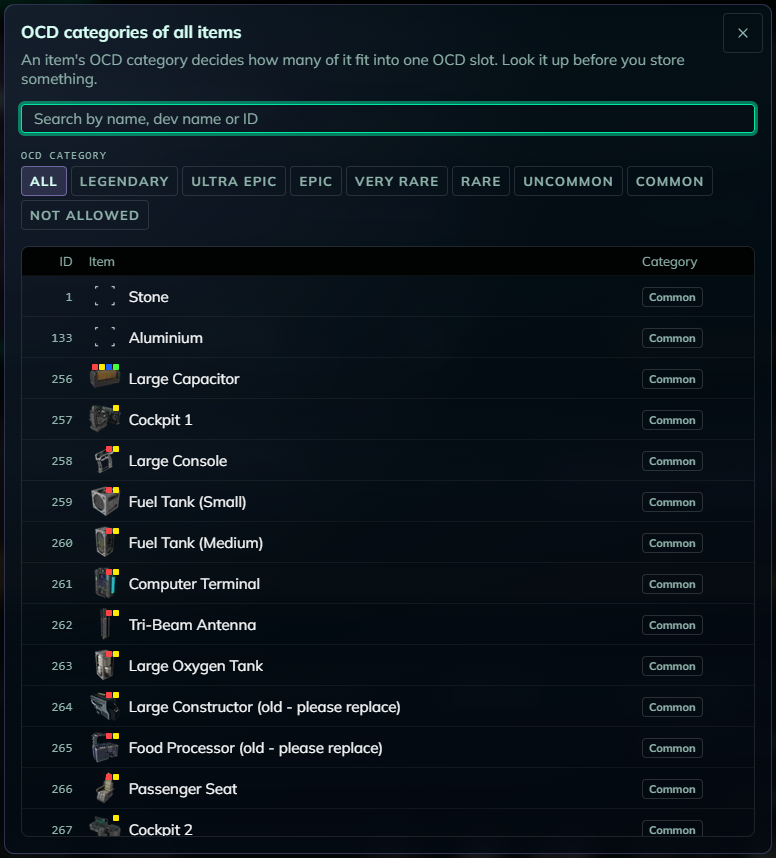
For the items already in your OCD, HWS Connect shows the category directly:
- Table view: the Category column (sortable and filterable)
- Grid view: category buttons above the cards. Click one to show only those items
- Backpack view: sort by Category. Each item has a border in its category colour, and hovering shows its category
| OCD level | Slots | Legendary | Ultra Epic | Epic | Very Rare | Rare | Uncommon | Common |
|---|---|---|---|---|---|---|---|---|
| 1 | 7 | 1 | 1 | 100 | 1,000 | 5,000 | 10,000 | 20,000 |
| 2 | 15 | 1 | 2 | 200 | 2,000 | 10,000 | 20,000 | 40,000 |
| 3 | 30 | 1 | 3 | 300 | 3,000 | 15,000 | 30,000 | 60,000 |
| 4 | 70 | 1 | 4 | 400 | 4,000 | 20,000 | 40,000 | 80,000 |
| 5 | 100 | 1 | 5 | 500 | 5,000 | 25,000 | 50,000 | 100,000 |
| 6 | 130 | 1 | 6 | 600 | 6,000 | 30,000 | 60,000 | 120,000 |
| 7 | 170 | 1 | 7 | 700 | 7,000 | 35,000 | 70,000 | 140,000 |
| 8 | 200 | 1 | 8 | 800 | 8,000 | 40,000 | 80,000 | 160,000 |
| 9 | 250 | 1 | 9 | 900 | 9,000 | 45,000 | 90,000 | 180,000 |
| 10 | 300 | 1 | 10 | 1,000 | 10,000 | 50,000 | 100,000 | 200,000 |
The numbers are items per slot. Amount / Max in the table and the fill bars in the grid use exactly these limits. Permanent OCD slots from supporter packages come on top of the slot count.
Alien cores can be stored at any OCD level now—Level 5 is no longer required.
 Upgrade costs
Upgrade in game with ocd:upgrade (or the OCD PDA button on HWS Connect), one level at a time. The Credits are taken from your Bank account, so deposit them first; the header on HWS Connect shows the price of your next level.
| Upgrade to level | Credits | HWS DNA |
|---|---|---|
| 2 | 287,500 | 50 |
| 3 | 575,000 | 100 |
| 4 | 4,025,000 | 200 |
| 5 | 8,050,000 | 400 |
| 6 | 80,500,000 | 600 |
| 7 | 805,000,000 | 1,250 |
| 8 | 920,000,000 | 2,500 |
| 9 | 1,035,000,000 | 5,000 |
| 10 | 1,150,000,000 | 10,000 |
Level 1 is free and level 10 is the maximum. From level 1 to 10 you pay 4,003,437,500 Credits and 20,100 HWS DNA in total.
 Blacklisted items
Some items are not allowed in the OCD at all. If you still have one stored from before, HWS Connect marks it with a warning badge in every view and lists it at the top of the page:


ocd:get(or Get on HWS Connect) before then.
 Fighter Origin Global OCD:get
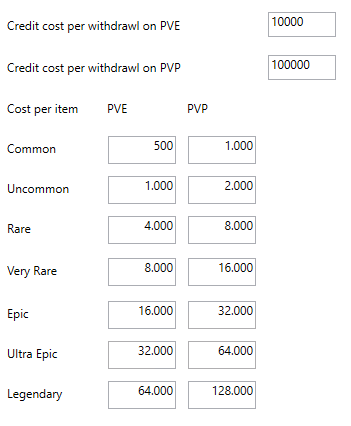
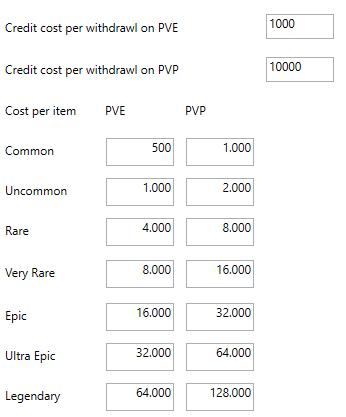
Players with Fighter Origin, HWS Master+ Patron or a purchased Master Origin can use ocd:get anywhere (outside OCD Zones) for a fee.
HWS RE Fee:
HWS+ Fee:
 OCD Zones
Usually, items can only be deposited or retrieved inside OCD Zones: invisible regions that vary in size and location.
Common Locations
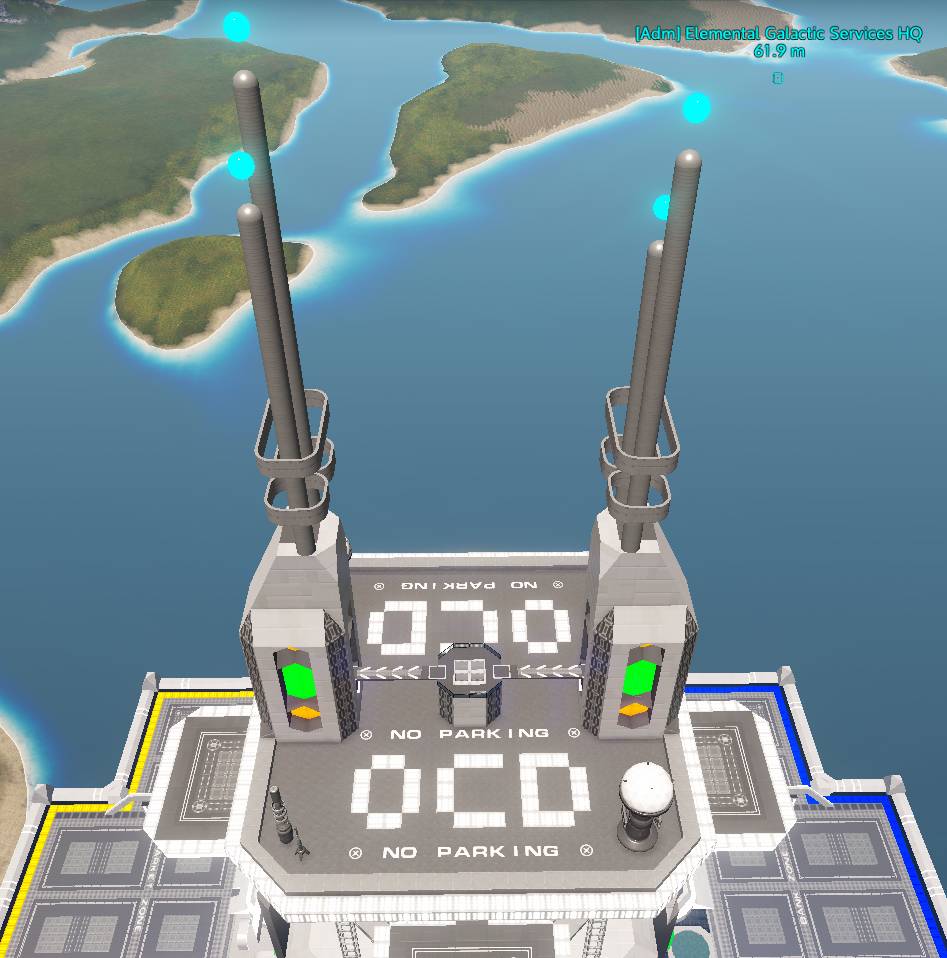
The most used OCD Zones are at EGS HQ and EGS HQ Outpost in the ECC sector.
Create Your Own OCD Zone
Purchase a Support Package to generate an OCD Zone at your base.
- Visit your desired PvE Base
- Type
do:oz:id(replace “id” with your Base ID from the Structure Commander or console:di)
OCD Zone Rules:
- Removed if the base is removed
- Size: 50x50x50 around the core
- Can be used by all players (not faction-locked)
- Only available in PvE playfields
- Cannot overlap with other zones (e.g., Recycle Zone)
- Removed if applied to a ship and CSW’d
 OCD Tickets
Use OCD Tickets to withdraw items outside an OCD Zone (PvP or PvE).
- Requires 1 PvP Token = 1 OCD Ticket
- Use them wisely!
 Common Questions & Messages
- “Your OCD is empty”: nothing is stored on this server yet. Upload items in game. Each server has its own OCD, OCD level and factory level.
- “You must be online on this server to do that.”: Get, Send and swaps are in-game deliveries. Join the server selected on the website.
- “The game service did not confirm the command. Check in game before sending it again.”: the delivery may have gone through. Check your inventory before retrying.
- “Another OCD operation is running or needs an admin review.”: a warp or craft is still moving items. Wait, or contact an admin if it doesn’t clear.
- “Some materials are missing from your OCD.”: the craft preview shows what is missing.
- Do not store weapons with ammo; the ammo will not be saved!
- If you haven’t logged in for 7+ days, your OCD may not show up until you log in and move around in game.
Disclaimer
- Items may be removed or altered during seasonal wipes for balance.
- You may request a complete OCD wipe to start fresh—contact
@RexXxuS.