Cross Server Warp (CSW) & CSW+ Guide
HWS has four main servers:
HWS+ EUandHWS+ NAHWS RE EUandHWS RE NA
You can use:
- CSW for travel between EU ↔ NA inside the same pair (HWS+ or HWS RE)
- CSW+ for travel between HWS+ ↔ HWS RE (same region, e.g. EU↔EU, NA↔NA)
Important Limitations
You cannot use CSW+ to transfer with ships between HWS+ and HWS RE.
For CSW+ (between HWS+ and HWS RE):
- only shipless transfer is supported
- only whitelisted items can cross
- non-whitelisted items are removed from transfer (no refund)
For normal CSW (EU ↔ NA in same pair), ships are supported as usual.
How Normal CSW Works (EU ↔ NA)
- Fly to the Cross Server Warp sector (CSW orbit).
- Use the destination command:
csw:start:nacsw:start:eu
- Confirm the dialog and wait for kick.
- Log into the destination server immediately.
- Wait up to 1-2 minutes for full completion.
Instead of step 2 you can click Start Cross Server Warp on HWS Connect (see below).
 Cross Server Warp on HWS Connect
 HWS Connect → Cross Server Warp (in the menu right under HWS Universe)
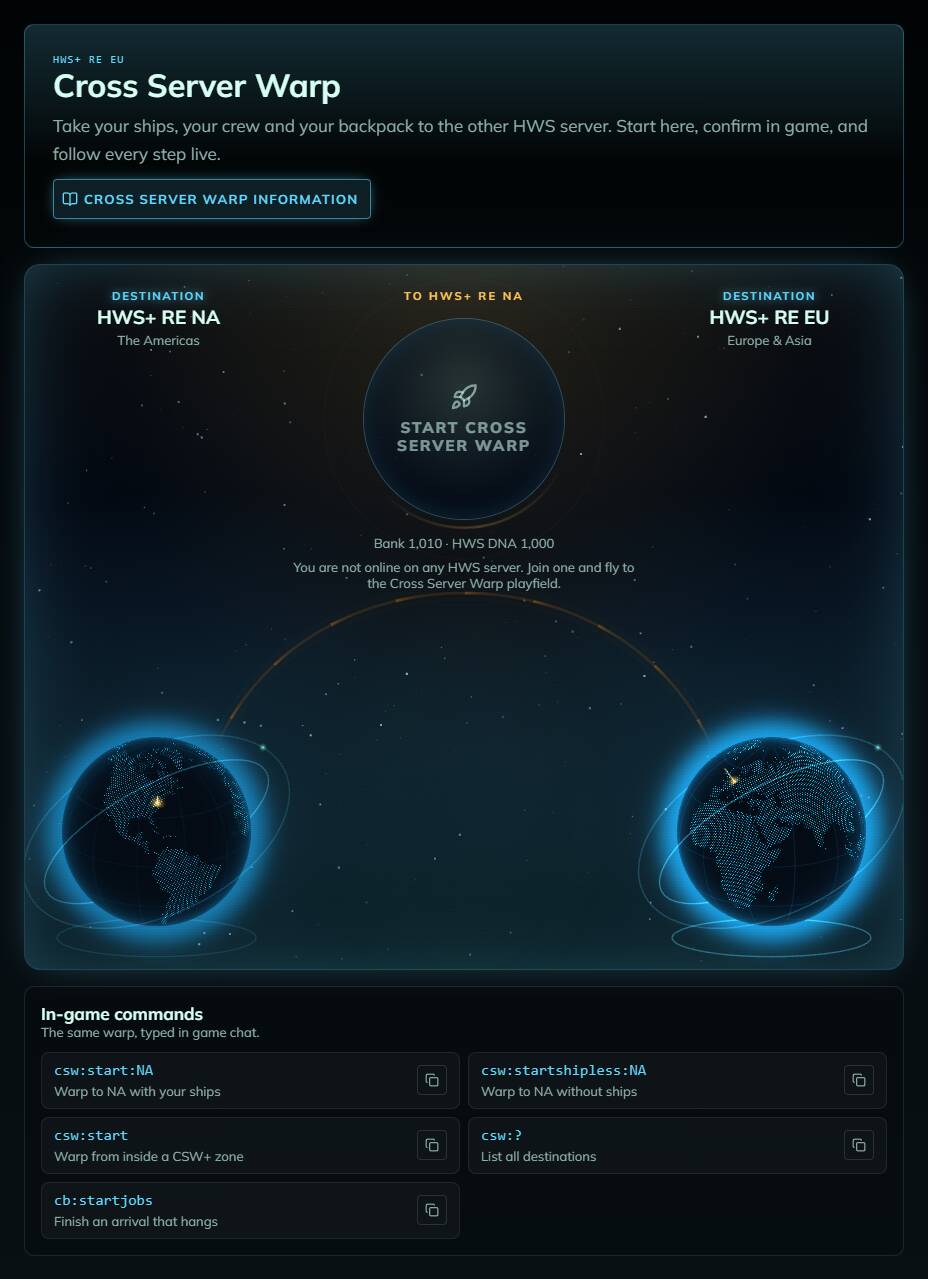
Two globes, the Americas (RE NA) and Europe & Asia (RE EU), joined by the warp bridge. You are here marks the server you are online on, the other side is your destination. Fly to the CSW sector in game and the page shows, refreshed every few seconds:
- Ships: the ships within 1 km of you and your crew that warp along, as live 3D models of their blueprints (drag to turn, scroll to zoom). A ship that can’t warp says why, e.g. it has a mobile zone
- Crew: your faction members within 1 km, who warp with you
- Backpack: what you take along. Items this warp doesn’t allow are flagged; they would be removed without refund, so take them out first
- Cost and your Bank / HWS DNA balance, and a Warp without ships switch
Click Start Cross Server Warp. This does exactly what csw:start:<destination> does: you get the same Yes/No question in game, and nothing happens before you click Yes. If something blocks the warp (wrong playfield, not enough Credits, warm-up after login …), the button tells you what.
After Yes, the page follows every step on both servers: Confirm → Pack → Send → Switch server → Land → Unpack, and tells you what to do at each one (don’t log out, log in to the other server now, stay online). At the “switch server” step HWS Connect switches to the destination server by itself, your ships appear on the arrival pad in 3D, and your backpack shows as it is on the new server. A failed or cancelled warp says so: your ships, Credits and backpack stay where they were.
Nothing happens a minute after you arrive? Type
cb:startjobsin game. All CSW commands are listed at the bottom of the page with a copy button.
How CSW+ Works (HWS+ ↔ HWS RE)
CSW+ is started from a dedicated CSW+ zone (EGS HQ, CSW+ Zone at the top).
- Fly into the configured CSW+ zone.
- Use command:
csw:start
- Confirm the dialog and wait for kick.
- Log into the destination server immediately.
- Wait for completion and use
cb:startjobsif needed.
The destination for CSW+ is defined by the zone configuration, not by
CSW:Start:EU/NA.
CSW+ item white-list
Currently these items are white-listed - so ONLY these items can be in your inventory while you initiate the CSW+ jump:
- all Reward Tokens
Before You Start
- High ping (300ms+) can delay destination server visibility.
- Do not log out during transfer.
- If needed after login, run
cb:startjobs. - Group warp works in normal CSW: your faction members within 1 km of you, and the ships within 1 km of the group, warp along.
- CSW warms up for 3 minutes after you log in, so you can’t warp straight away.
- Spamming CSW commands can lead to punishment.
- Mobile/supporter zones on ships are not preserved through CSW (ID remap effects).
What Transfers
Normal CSW (EU ↔ NA, same pair)
- player inventory
- ships (with cargo/fuel/O2)
- HWS DNA
- player credits/wallet
CSW+ (HWS+ ↔ HWS RE)
- player data
- inventory limited by whitelist
- shipless only
What Does Not Transfer
- Elemental Bank credits
- armor and armor boosters
- HWS ingots
- tech tree unlock points
- player XP level
- supporter zones attached to ships (OCD/EB/etc.)
- ships in CSW+ transfers
Cost
| Tier | Cost |
|---|---|
| Explorer Origin | Free |
| Master Origin (supporter package) | Free |
| HWS Master, Meta and Astral patrons | Free |
| HWS Elite | 100k + 1 DNA |
| HWS Veteran | 200k + 2 DNA |
| HWS Survivor | 300k + 3 DNA |
| HWS Pro | 400k + 4 DNA |
| Everyone else | 500k + 5 DNA |
| Shipless CSW | Free |
Passenger warps in a ship run are not considered shipless.
The Credits are taken from your Bank account. On HWS Connect the Start button shows your cost (or why the warp is free) and your balance before you start.
Timing & Reliability
- Avoid starting CSW close to restart windows.
- If destination services are down, transfer can fail.
- Always keep your server time for support (
cb:time).
Troubleshooting
If anything looks wrong, create a support ticket here in the forum: https://help.hws.global
or in Discord: Discord
Include:
- your player name + Steam ID
- source and destination server
- approximate server time (
cb:time) - whether it was CSW or CSW+
- if CSW+, from which zone you started
One Character Rule
If you have different active characters on both sides, CSW can overwrite one identity state.
Decide beforehand which character/progress you want to keep.
Can I Park in CSW Orbit?
No.
CSW orbit is taxed and not intended for permanent parking.
Nothing is delivered while you are in the CSW sector: Daily Loot, votes and other rewards wait and arrive once you fly out. The HWS Trader and the Marketplace don’t work there either.